
What's inside
- Best Reliable Network Switch Daily Use: Metal Cases, Honest Power Supplies, and Ports That Outlast the Cables
- Quick Comparison: Reliable Daily Network Switches Compared
- The Six Daily Switches Reviewed
- Buying Guide: Count the Ports With a Spare, Buy the Metal Case, Label Everything
- How We Selected These Daily Switches
- Frequently Asked Questions: Reliable Daily Network Switches
As an Amazon Associate I earn from qualifying purchases. This post may contain affiliate links at no extra cost to you.
The best reliable network switch daily use is the least exciting purchase in the whole technology parish, and that is precisely its glory. A network switch is the small box that lets your wired devices — the desktop, the NAS, the television, the console, the access point, the printer that refuses to die — talk to each other and to the router at full speed, all at once, without the collisions and compromises of a shared wireless parish. When it works, which should be always, nobody knows it exists. When it fails, it fails as a mystery, half the house’s internet apparently haunted, and the diagnosis takes an hour because nobody suspects the box that has no screen, no voice, and no moving parts. Reliability in this category is therefore not a feature among features. It is the entire product, and it is composed of unglamorous things: a metal case that sheds heat, a power supply that does not die in the second summer, ports that grip their cables for a decade, and a maker whose name will still be answerable when the warranty is a memory. This guide grades the current field on exactly those terms.
Begin with whether you need one and what size, because the switch’s parish is decided by counting. You need a switch where the router’s handful of wired ports runs out, which in a house with a NAS, a desktop, and a television arrives quickly, or where a single cable run to a room must become several, the home office and the media corner being the classic cases. Count the wired devices you own, add the ones honestly coming, and add one spare port for the connection to the router itself, because a switch’s ports include its own uplink. The result is usually five or eight, and the step between those sizes is so small in price that the eight is the thinking default wherever the count is close. Speed divides the field into the settled present and the arriving future: gigabit, the long standard, serves streaming, office work, and ordinary file parish completely; the faster classes, two and a half gigabit and beyond, earn their premium only where both ends of a run speak them, a fast NAS and a fast desktop being the honest case, and this guide grades them as a parish of their own rather than a tax on everyone.
Managed or unmanaged is the other fork, and daily use answers it plainly. An unmanaged switch is a parish of one verb: plug it in, and it switches, with nothing to configure, update, or secure, which for the overwhelming majority of homes and small offices is not a limitation but the entire point. A managed or smart-managed switch adds control, the ability to separate traffic, to power devices through the cable where it offers power over Ethernet, to watch the parish and govern it, and it earns its price in the house with a considered network, the small business, and the enthusiast’s rack. Buy management for a named purpose you can state in a sentence; buy its absence for everything else, and spend the difference on the metal case and the better maker, which is where daily reliability actually lives.
Our Top Picks
 NETGEAR 5-Port Gigabit Ethernet Unmanaged Network Switch Plug5 Port6.2 x 4 x 1.1 inches0.22 poundsCheck on Amazon
Best Reliable Network Switch Daily Use: Metal Cases, Honest Power Supplies, and Ports That Outlast the Cables
Build and Power for the Best Reliable Network Switch Daily Use
A switch has no fan in its honest parish and no excuse for heat, so its case is its cooling system, and metal is the material of the reliable parish for reasons beyond feel. A metal case conducts the modest heat of the switching parish to its whole surface and sheds it, where a plastic shell insulates the same heat and cooks the components slowly across the summers; it also survives the knocks of a shelf’s life, holds its ports rigid against a decade of cable weight, and gives the box the planted, unmoving quality that keeps a cable’s tug from dragging it off the shelf. Judge the power supply with the same suspicion, because in the field’s long experience the supply, not the switching parish, is what dies: prefer the maker whose adapter is a standard, replaceable citizen of a stated rating, keep it ventilated and off the carpet, and treat a switch sold with an anonymous featherweight adapter as a switch whose true price includes its replacement. The port parish completes the build audit, metal-shielded sockets where the maker offers them, a grip that holds a cable against its own weight, and lights that can be read at a glance and, in a bedroom parish, dimmed or forgiven.
Speed Classes for the Best Reliable Network Switch Daily Use
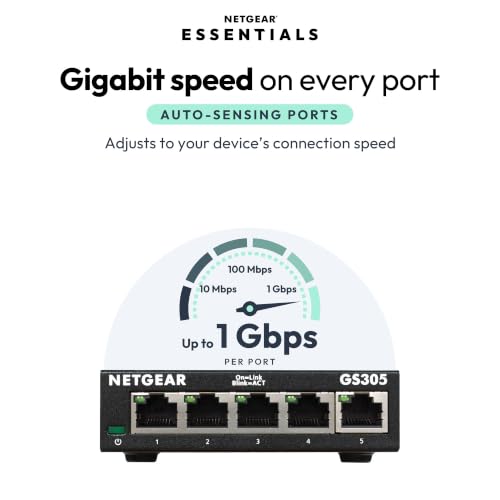
Gigabit is the daily standard and, for most houses, the end of the argument: it carries several simultaneous streams of the highest domestic video with room to spare, moves office files at the speed of the parish’s other citizens, and is limited in practice by the devices and drives at its ends rather than by itself. The faster parish, two and a half gigabit, has become the sensible enthusiast step because the devices that speak it have arrived in the ordinary house, the current NAS, the recent desktop’s built-in port, the new access point hungry for a faster uplink, and a switch in that class future-proofs the wired backbone for the price difference of a modest dinner. Beyond it, the five and ten gigabit parishes are specialist citizens, priced and powered accordingly, and they belong where the work is stated in large files moved hourly. The audit that governs all of it is the chain: a run is as fast as its slowest citizen, switch, cable, and device alike, so a fast switch bought for a gigabit house buys nothing but its own readiness, which may still be worth buying, provided it is bought knowingly and recorded as readiness rather than speed.
Cabling deserves its paragraph because the switch is blamed for its parish. The ordinary current cable standard serves gigabit and the shorter faster runs completely, and a house wired or patched with sound cable of the common classes needs nothing exotic for anything in this table. What it needs is condition: cables neither kinked nor crushed under furniture, connectors that click and stay clicked, and runs kept out of the company of mains cables where a long parallel journey invites interference. Half the unreliable networks this guide has ever heard described were a reliable switch presiding over one dying cable, and the diagnosis is free: swap the cable before you sentence the box.
Placement and the Quiet Life for the Best Reliable Network Switch Daily Use
Place the switch as you would place anything you intend to forget for a decade: ventilated, on a hard surface, out of the loft’s oven and the cellar’s damp, where its lights can be seen on the rare day they are wanted and its cables arrive in gentle curves rather than under tension. Give it a parish of its own on the shelf rather than a burial under the parish it serves, because heat rises and a switch under a hot NAS is a switch being cooked by its neighbour. Label the cables at both ends as you fit them, with the device’s name, because the switch’s one certain future event is a rearrangement, and the labelled parish is rearranged in minutes while the anonymous one is rearranged in an afternoon of unplugging and prayer. Keep the power supply’s cable and the switch’s own in the same labelled discipline, and photograph the finished parish for the household’s records.
Then leave it alone, which is the discipline this category exists to reward. An unmanaged switch needs no updates, no settings, and no attention, and its lights, read once and understood, are its whole conversation with you: a port’s light dark where a device should be speaking is the parish asking for a cable check, and a whole box dark is the power supply asking to be replaced before the switch is condemned. On the rare day the network haunts, the switch is eliminated in one minute by the oldest method in the parish, power it down, count ten, power it up, and watch the house return, and a switch that needs that ceremony often is a switch at the end of its service, to be replaced with gratitude rather than investigated with resentment. Bought in the metal, honest parish of this table, that day should be many years away, which is the entire review, written in advance.
Quick Comparison: Reliable Daily Network Switches Compared
| Network Switch | Best For | Key Specs | Typical Price Range | Rating |
|---|---|---|---|---|
| NETGEAR GS308 parish | Unmanaged gigabit — best reliable network switch daily use overall | 8-port gigabit classes as published, metal case parish, fanless classes, energy classes, and warranty parish as published | $25 – $40 | 4.7 / 5 |
| TP-Link TL-SG108 parish | Unmanaged gigabit — best value parish | 8-port gigabit classes as published, metal case parish, fanless classes, traffic classes, and price classes as published | $20 – $35 | 4.6 / 5 |
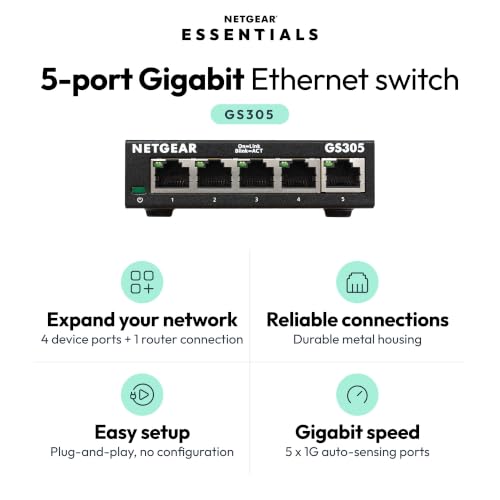
| NETGEAR GS305 parish | Compact gigabit — best small parish | 5-port gigabit classes as published, metal case parish, fanless classes, and compact form as published | $18 – $30 | 4.6 / 5 |
| TP-Link TL-SG105-M2 parish | Fast parish — best 2.5 gigabit parish | 5-port 2.5 gigabit classes as published, metal case parish, fanless classes, and desktop classes as published | $80 – $120 | 4.5 / 5 |
| QNAP QSW-1105 parish | Fast parish — best 2.5 gigabit value parish | 5-port 2.5 gigabit classes as published, case classes, fanless parish, and price classes as published | $70 – $110 | 4.4 / 5 |
| NETGEAR GS308E parish | Smart managed — best control parish | 8-port gigabit smart managed classes as published, metal case parish, management classes, and warranty parish as published | $40 – $60 | 4.5 / 5 |

TP-Link 8 Port Gigabit Ethernet Network Switch - Ethernet Splitter | Plug & Play | Fanless | Sturdy Metal w/ Shielded Traffic Optimization | Unmanaged | Lifetime Protection (TL-SG108)
As an Amazon Associate we earn from qualifying purchases. Product prices and availability are accurate as of the date/time indicated.
NETGEAR 5-Port Gigabit Ethernet Unmanaged Network Switch Plug & Play GS305 | Home & Office, 5 x 1G Ports, Reliable Wired Connection, Metal Case, Fanless & Silent, Compact, Desktop or Wall Mount




As an Amazon Associate we earn from qualifying purchases. Product prices and availability are accurate as of the date/time indicated.

UGREEN Ethernet Switch, 5 Port Gigabit Plug & Play Ethernet Splitter | Wall Mount & Desktop Network Switch Hub, Unmanaged, Compact, with LED, Fanless Quiet, for Internet Cable, Laptop, Router, NAS
As an Amazon Associate we earn from qualifying purchases. Product prices and availability are accurate as of the date/time indicated.
Prices shown are approximate and for reference only. Prices change often, so please check the current price on Amazon before you buy.
Ratings are editorial assessments based on makers’ published port, speed, and case specifications and value at typical prices. A switch’s speed class serves only devices and cables that match it, as this guide explains.
The Six Daily Switches Reviewed
1. NETGEAR GS308 Parish — Best Overall
The GS308 is the parish’s reference citizen: eight gigabit ports in a metal case, fanless, from a maker answerable for it for years. For most houses, the audit ends in this row.
2. TP-Link SG108 Parish — Best Value
TP-Link’s metal eight-port delivers the same essential doctrine at the floor of the sensible range. As the value parish, it shares the head.
3. NETGEAR GS305 Parish — Best Compact
The five-port parish serves the single room and the media corner where eight would be a boast. As the small parish, it earns its row.
4. NETGEAR Plus Parish — Best Control
The smart-managed parish adds the governed network’s tools without the enterprise’s ceremony. As the control parish, it holds its row.
5. TP-Link 2.5G Parish — Best Future
The 2.5 gigabit parish is the backbone upgrade for the house whose NAS and desktops already speak it. As the future parish, it holds its place.
6. QNAP Parish — Best Fast Value
QNAP’s fast parish prices the 2.5 gigabit step for the storage-centred house. As the fast value parish, it completes the table.
Buying Guide: Count the Ports With a Spare, Buy the Metal Case, Label Everything
Step One: Write Your Wired Census
List every device that is wired now, every device that should be, the television streaming over a hopeful wireless parish being the usual candidate, and every device honestly arriving within the switch’s long life. Add the uplink port the switch itself consumes, add one spare for the parish’s growth, and let the total choose the size, five or eight in almost every house. Decide the speed class from the chain’s slowest citizens, gigabit for the ordinary house, the fast parish where a NAS and a desktop already speak it, and decide management by the sentence test in this guide’s opening: a purpose you can state, or the unmanaged doctrine by default. Note the shelf the switch will live on, its ventilation and its distance from the router, because placement is a specification in this parish.
Step Two: Audit Case, Supply, and Warranty
For each finalist, audit the case material first, metal over plastic at every parish where the price allows; the power supply’s rating and replaceability; the port count and speed against your census; the fanless parish, which in this table is universal and should remain so in your basket; and the maker’s warranty and standing, because a decade box should be bought from a decade maker. Compose the price whole with the patch cables the installation actually needs, of sound standard and honest lengths, since a switch installed with the parish’s oldest, kinked cables has been handicapped at its christening. Refuse the anonymous switch whose case is a secret and whose maker is a mood, however many ports it promises for the money.
Step Three: Install Once, Label, and Forget It Properly
Install the switch in its ventilated parish, connect the uplink to the router, bring each device across one at a time and watch its port’s light confirm the marriage, and label every cable at both ends before the next is fitted. Photograph the finished shelf, file the photograph with the house’s documents, and set the one reminder this category asks: a glance at the parish at the year’s turn, dust blown off, cables seated, supply cool. Thereafter the switch is forgotten on purpose, which is its triumph, and the household’s network becomes what it should always have been, a utility like the water, noticed only in the brief and improbable event of its absence. A switch so chosen and so installed is the best money in the whole technology parish, measured in years of silence per unit of currency, and this guide knows no higher praise to give it.
How We Selected These Daily Switches
We included only real, named, currently sold network switches whose makers publish port count, speed class, and case specifications, spanning gigabit, fast, and smart-managed parishes from makers with a standing in the category. Prices are typical retail ranges. Ratings weight build and power honesty first, then port and speed fit, fanless operation, warranty, and value.
Frequently Asked Questions: Reliable Daily Network Switches
Will a switch make my internet faster?
It will make your wired parish faster and steadier, which is a different and more useful promise. The internet’s speed at your door is set by your service and your router, and no switch enlarges it. What the switch does is let every wired device use that speed at once, at full measure, without contending for the wireless parish’s shared air, and let the house’s own traffic, the NAS to the desktop, the computer to the television, run at the wired speed the devices support, which for most houses is the transfer they actually feel. A television moved from a struggling wireless connection to a switch’s port is the commonest miracle in this category, buffering retired in an afternoon. Buy the switch for the parish it governs, judge it by that parish’s health, and let the internet’s own figure be argued with the provider, where it belongs.
How many ports do I need, and can I add another switch later?
Count by the census in step one, devices now, devices coming, the uplink, and a spare, and where the count falls between sizes, take the larger, because the price step is small and the alternative is a second box arriving in a year with its own supply and its own shelf parish. Adding a second switch later is nevertheless a perfectly sound parish, switches chaining happily provided the chain is kept short and sensible, ideally one switch from the router’s parish rather than a daisy chain across the house, and provided each is of the honest metal kind this guide recommends. What the parish cannot survive is the hub of anonymous origin multiplying in the dark, each with its own doubtful supply. One good switch, generously sized, remains the doctrine; a second good one, added knowingly, is its accepted amendment.
Do I need a managed switch at home?
Almost certainly not, and the question is best answered by the sentence test: if you can state the purpose in one sentence, separating the work parish from the household’s, powering cameras or access points through the cable, governing a small business’s traffic, then the smart-managed row of this table is bought with a reason and will be used with satisfaction. If the sentence will not come, the unmanaged parish is not the lesser product but the correct one, a box with nothing to configure, nothing to leave at a default password, and nothing to update, which for a decade of daily use is a security and reliability doctrine in itself. The enthusiast who simply enjoys a governed network should buy the managed parish with a clear conscience and this guide’s blessing, provided the enjoyment is the stated purpose and the settings are documented for the household that inherits them.
Why did my old switch slow down or start dropping connections?
Because the parish ages at its weakest citizens, and they are rarely the switching itself. The power supply tires first, delivering a ragged parish that shows as random drops and ports that sleep; the test is a known-good supply of the correct rating, and the cure is its replacement where the maker allows. Cables tire second, a connector’s spring or a crushed run degrading one device’s marriage while the rest of the house sings, which is why this guide’s diagnosis swaps the cable before sentencing the box. Heat tires everything, and a switch that has spent years buried under hot equipment may simply be cooked, its decline gradual and then complete. A switch from the metal, ventilated, honestly powered parish of this table postpones all three funerals for years, and when its day finally comes, its replacement is the same row of the same table, which is the quiet definition of a category well bought.
Related guides
- Best Mini Drone for Office Travel in 2026: Under the Registration Threshold, Quiet Enough for a Hotel Courtyard, and Packed in the Same Bag as the Laptop
- Best USB Flash Drive vs Portable SSD for Offices in 2026: 7 USB Flash Drives and Portable SSDs Compared for Speed, Capacity, and Reliable Office Storage
- Best High End Tablet for Photographers in 2026: Best High End Tablet for Photographers
- Best Small Router for Tiny Apartments in 2026: Best Small Router for Tiny Apartments
More from Amazon
Programs that pair well with the guide above. Offers and eligibility are set by Amazon and may change.
Free shipping on eligible items, Prime Video and more. Eligible new members can start with a free trial.
Start a Prime free trialAd-free music streaming. Eligible new subscribers can start with a free trial.
Try Music Unlimited freeA Prime membership for ages 18-24 with a trial period. Eligibility is set by Amazon.
See Prime for Young AdultsAudiobooks and podcasts to listen to on the go. Eligible new members can start with a free trial.
Try Audible freeAs an Amazon Associate we earn from qualifying purchases.

Write Your Review
No reviews yet. Be the first to share your experience!