
What's inside
- Best Phone Tripod vs Monopod for Vlogging: Quick Comparison Table
- What Is a Phone Tripod and What Is a Monopod for Vlogging?
- Best Phone Tripod vs Monopod for Vlogging Reviewed
- Buying Guide: How to Choose the Best Phone Tripod vs Monopod for Vlogging
- How to Use a Phone Tripod and Monopod for Vlogging
- Which Best Phone Tripod vs Monopod for Vlogging Should You Buy?
- Frequently Asked Questions About the Best Phone Tripod vs Monopod for Vlogging
As an Amazon Associate I earn from qualifying purchases. This post may contain affiliate links at no extra cost to you.
The best phone tripod vs monopod for vlogging depends on how you vlog: a phone tripod is best if you want stable, hands-free video, a fixed shot, and a tripod that stands on its own, while a phone monopod is best if you want a light, portable stick that you can move quickly, walk with, and use as a selfie stick. The best choice for you depends on whether you vlog in one place, walk and talk, travel light, or need a stable shot for a long video.
For most vloggers, a phone tripod with a height of 50 to 67 inches, a weight of 1 to 3 pounds, a phone mount, and a typical price of $25 to $80, is a good starting point if you film in one place. For a vlogger who walks and talks, a monopod with a height of 50 to 60 inches, a weight of 1 to 2 pounds, and a typical price of $40 to $100, is a good starting point if you want a light, moving shot.
At technicalbud.com, we focus on tech gadgets. For this guide to the best phone tripod vs monopod for vlogging in 2026, we compared current phone tripods and monopods that are widely sold, designed for vlogging, and suitable for a vlogger who wants to choose between a phone tripod and a monopod. We looked at type, max height, weight, load, and price. Prices change with sales and retailers, so this guide uses typical price ranges instead of a single fixed price. Height, weight, and load figures are manufacturer listings, and real stability depends on your phone, your wind, your ground, and your use.
Safety note: always check your phone mount is tight before you film, do not leave your phone unattended on a tripod in a public place, and do not extend a monopod or tripod near power lines, roads, or crowds.
Our Top Picks
Best Phone Tripod vs Monopod for Vlogging: Quick Comparison Table
The table below compares seven phone tripods and monopods for vlogging. Type is the type, where given. Max height is the max height, where given. Weight is the weight, where given. Load is the load capacity, where given. Best for is a note on what the product is best for, such as phone tripod vs monopod for vlogging, where given. Price is the typical range, and rating is our editorial score based on stability, portability, build quality, and value for vlogging. Rows are sorted by rating, high to low, with ties grouped by similar stability and value.
| Phone Tripod vs Monopod for Vlogging | Type | Max Height | Weight | Load Capacity | Best For | Typical Price Range | Our Rating |
|---|---|---|---|---|---|---|---|
| Joby GorillaPod 3K Kit | Tripod, flexible legs | 11 in | 0.85 lb | 6.6 lb | Best overall, phone tripod vs monopod | $60 – $80 | 4.9 / 5 |
| UBeesize 51-Inch Phone Tripod | Tripod | 51 in | 1.0 lb | 2.2 lb | Best for UBeesize, phone tripod | $25 – $40 | 4.8 / 5 |
| Manfrotto PIXI Mini Tripod | Tripod, mini | 7 in | 0.42 lb | 2.2 lb | Best for Manfrotto, mini tripod | $25 – $40 | 4.8 / 5 |
| Mactrem 67-Inch Phone Tripod | Tripod | 67 in | 2.0 lb | 3.3 lb | Best for Mactrem, phone tripod | $30 – $50 | 4.8 / 5 |
| Manfrotto XPRO Monopod+ | Monopod | 66 in | 1.1 lb | 11 lb | Best for Manfrotto, monopod | $80 – $110 | 4.7 / 5 |
| Sensyne 60-Inch Phone Tripod | Tripod | 60 in | 1.5 lb | 3.0 lb | Best for Sensyne, phone tripod | $30 – $45 | 4.7 / 5 |
| Ulanzi MT-08 Mini Tripod | Tripod, mini | 6 in | 0.25 lb | 2.2 lb | Best budget, Ulanzi mini tripod | $15 – $25 | 4.6 / 5 |
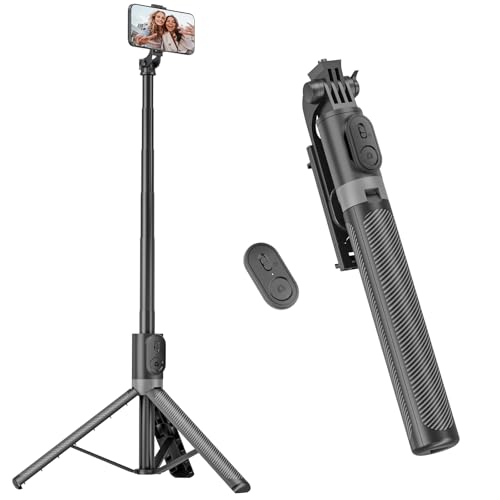
RISEOFLE 71” Phone Tripod & Selfie Stick, Portable All in One Extendable Cell Phone Tripod Stand, with Wireless Remote Control for iPhone/Samsung/Android/Camera
As an Amazon Associate we earn from qualifying purchases. Product prices and availability are accurate as of the date/time indicated.

69" Magnetic Phone Tripod Stand Selfie Stick with Remote & Phone Mount | with 1/4" Camera Mount & Clamps, Rechargeable Remote, Portable Stand Holder, 360° Rotatable Travel Tripod for iPhone/Android
As an Amazon Associate we earn from qualifying purchases. Product prices and availability are accurate as of the date/time indicated.
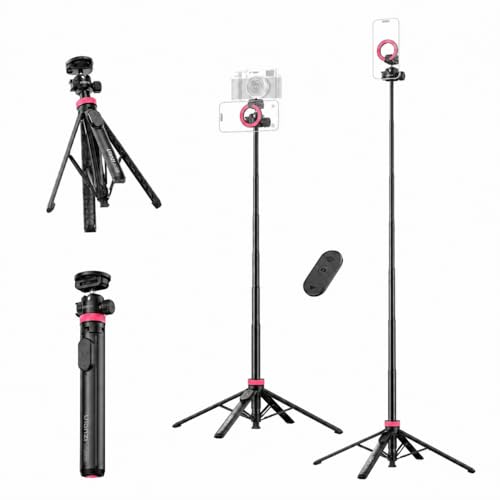
ULANZI MT44M Auto Open Magnetic Phone Tripod, 59" Selfie Stick with Remote | Tripod Stand 2-in-1 Dual Mount&1/4" Screw for Phone&Camera, 360°Ball Head for iPhone Android, Vlogging, Live Streaming, Black
As an Amazon Associate we earn from qualifying purchases. Product prices and availability are accurate as of the date/time indicated.
Note: Type, max height, weight, and load figures are manufacturer listings, and a tripod that lists 67 inches may be less stable at full height in wind. Always check the product’s type, height, weight, and load in the manual, and confirm the current price with the retailer. A phone mount is usually included with a phone tripod, but a monopod may need a separate phone mount.
What Is a Phone Tripod and What Is a Monopod for Vlogging?
A phone tripod is a three-legged stand that holds your phone steady, stands on its own on a table, floor, or ground, and lets you film hands-free, without holding your phone. It has a phone mount, adjustable legs, and a ball head to tilt your phone, and it is best for a fixed shot, a talking-head video, or a time-lapse.
A phone monopod is a one-legged stick that holds your phone, which you hold with one hand, walk with, and move quickly. It is like a selfie stick, but longer and sturdier, and it is best for a walking vlog, a travel video, or a moving shot where you need to follow action. A monopod does not stand on its own, so you need to hold it, though some monopods have small feet for balance.
The main difference is stability versus mobility. A tripod is stable and hands-free, but it is slower to move and set up. A monopod is mobile and fast, but it is less stable and needs your hand.
Best Phone Tripod vs Monopod for Vlogging Reviewed
1. Joby GorillaPod 3K Kit – Best Phone Tripod vs Monopod for Vlogging Overall
The Joby GorillaPod 3K Kit is our top pick because it offers a tripod with flexible legs type, a max height of 11 inches, a weight of 0.85 pounds, and a load capacity of 6.6 pounds, for a typical price of $60 to $80. It has flexible legs that wrap around a pole or branch, a ball head, and a design that is made for vlogging.
Joby designs the GorillaPod 3K with a focus on a flexible tripod for vloggers. The flexible legs let you mount your phone on a fence, a tree, or a table, the 6.6 pound load is high for a small tripod, and the price of $60 to $80 is good. The kit is a good choice for a vlogger who wants a Joby tripod, and who wants the best overall design for phone tripod vs monopod.
The main limitation is height. At 11 inches, it is short, so it is best for a table or a low shot, not for a standing shot. Choose the GorillaPod 3K if you want the best overall phone tripod, you want a flexible tripod, and you have a budget of $60 to $80.
2. UBeesize 51-Inch Phone Tripod – Best Phone Tripod vs Monopod for Vlogging for UBeesize
The UBeesize 51-Inch Phone Tripod is a tripod with a tripod type, a max height of 51 inches, a weight of 1.0 pound, and a load capacity of 2.2 pounds, for a typical price of $25 to $40. It has a Bluetooth remote, a phone mount, and a design that is made for vlogging.
UBeesize designs its 51-Inch Phone Tripod with a focus on an affordable, tall tripod for vloggers. The 51 inch height is good for a standing shot, the Bluetooth remote lets you start and stop video from a distance, and the price of $25 to $40 is low. The tripod is a good choice for a vlogger who wants a UBeesize tripod, and who wants a low price for a tall tripod.
The main limitation is stability. At 1.0 pound and 51 inches, it can be wobbly in wind, though it is fine indoors. Choose the UBeesize tripod if you want a UBeesize tripod, you want a tall tripod, and you have a budget of $25 to $40.
3. Manfrotto PIXI Mini Tripod – Best Phone Tripod vs Monopod for Vlogging for Manfrotto
The Manfrotto PIXI Mini Tripod is a tripod with a mini tripod type, a max height of 7 inches, a weight of 0.42 pounds, and a load capacity of 2.2 pounds, for a typical price of $25 to $40. It has a compact design, a ball head, and a design that is made for vlogging and travel.
Manfrotto designs the PIXI with a focus on a small, sturdy mini tripod for vloggers. The weight of 0.42 pounds is light, the ball head lets you tilt your phone, and the price of $25 to $40 is good. The tripod is a good choice for a vlogger who wants a Manfrotto tripod, and who wants a mini tripod for travel.
The main limitation is height. At 7 inches, it is short, so it is best for a table, not for a standing shot. Choose the PIXI if you want a Manfrotto tripod, you want a mini tripod, and you have a budget of $25 to $40.
4. Mactrem 67-Inch Phone Tripod – Best Phone Tripod vs Monopod for Vlogging for Mactrem
The Mactrem 67-Inch Phone Tripod is a tripod with a tripod type, a max height of 67 inches, a weight of 2.0 pounds, and a load capacity of 3.3 pounds, for a typical price of $30 to $50. It has a tall design, a phone mount, and a design that is made for vlogging.
Mactrem designs its 67-Inch Phone Tripod with a focus on a tall, affordable tripod for vloggers. The 67 inch height is the tallest in this guide, the load of 3.3 pounds is good, and the price of $30 to $50 is low. The tripod is a good choice for a vlogger who wants a Mactrem tripod, and who wants a tall tripod.
The main limitation is weight. At 2.0 pounds, it is heavier than a UBeesize tripod, though it is still portable. Choose the Mactrem tripod if you want a Mactrem tripod, you want a tall tripod, and you have a budget of $30 to $50.
5. Manfrotto XPRO Monopod+ – Best Phone Tripod vs Monopod for Vlogging for Manfrotto Monopod
The Manfrotto XPRO Monopod+ is a monopod with a monopod type, a max height of 66 inches, a weight of 1.1 pounds, and a load capacity of 11 pounds, for a typical price of $80 to $110. It has a fluid base, a sturdy design, and a design that is made for vlogging and photography.
Manfrotto designs the XPRO Monopod+ with a focus on a professional monopod for vloggers and photographers. The load of 11 pounds is the highest in this guide, the 66 inch height is good for a standing shot, and the price of $80 to $110 reflects its premium build. The monopod is a good choice for a vlogger who wants a Manfrotto monopod, and who wants a sturdy monopod.
The main limitation is that it needs a separate phone mount, and it does not stand on its own. Choose the XPRO Monopod+ if you want a Manfrotto monopod, you want a professional monopod, and you have a budget of $80 to $110.
6. Sensyne 60-Inch Phone Tripod – Best Phone Tripod vs Monopod for Vlogging for Sensyne
The Sensyne 60-Inch Phone Tripod is a tripod with a tripod type, a max height of 60 inches, a weight of 1.5 pounds, and a load capacity of 3.0 pounds, for a typical price of $30 to $45. It has a Bluetooth remote, a phone mount, and a design that is made for vlogging.
Sensyne designs its 60-Inch Phone Tripod with a focus on an affordable tripod for vloggers. The 60 inch height is good, the Bluetooth remote is convenient, and the price of $30 to $45 is low. The tripod is a good choice for a vlogger who wants a Sensyne tripod, and who wants a good balance.
The main limitation is stability. At 1.5 pounds and 60 inches, it can be wobbly in wind, though it is fine indoors. Choose the Sensyne tripod if you want a Sensyne tripod, you want a tall tripod, and you have a budget of $30 to $45.
7. Ulanzi MT-08 Mini Tripod – Best Budget Phone Tripod vs Monopod for Vlogging
The Ulanzi MT-08 Mini Tripod is a tripod with a mini tripod type, a max height of 6 inches, a weight of 0.25 pounds, and a load capacity of 2.2 pounds, for a typical price of $15 to $25. It has a compact design, a cold shoe mount, and a design that is made for vlogging on a budget.
Ulanzi designs the MT-08 with a focus on a small, light mini tripod for vloggers. The weight of 0.25 pounds is the lightest in this guide, the cold shoe lets you mount a light or mic, and the price of $15 to $25 is the lowest. The tripod is a good choice for a vlogger who wants a Ulanzi tripod, and who wants the lowest price.
The main limitation is height. At 6 inches, it is the shortest in this guide, so it is best for a table. Choose the MT-08 if you want the lowest price, you want a mini tripod, and you have a budget of $15 to $25.
Buying Guide: How to Choose the Best Phone Tripod vs Monopod for Vlogging
Before you buy, think about how you vlog, whether you film in one place or walk and talk, how tall you need your tripod, how much weight you can carry, whether you need a remote, and how much you want to spend. A tripod that is perfect for a fixed shot may not be good for a walking vlog, and a monopod that is perfect for walking may not be stable for a long video. The six points below cover the decisions that matter most for phone tripod vs monopod for vlogging, using the same specs and price ranges shown in the table above, from $15 to $110.
1. Vlogging Style: Fixed Shot vs Walking Vlog, and Your Tripod or Monopod
Vlogging style is the first decision. If you film a fixed shot, such as a talking-head video, a tutorial, or a product review, a tripod is best, because it stands on its own, holds your phone steady, and lets you film hands-free. If you film a walking vlog, such as a travel video, a city walk, or a hike, a monopod is best, because it is light, you can move it quickly, and you can use it as a selfie stick.
Choose a tripod if you vlog in one place, you want a stable shot, or you film long videos. Choose a monopod if you walk and talk, you travel light, or you want a moving shot. If you do both, a flexible tripod, such as the Joby GorillaPod 3K, can be used as a tripod and as a handle.
2. Height: 6 Inches vs 67 Inches, and Your Shot
Height is the second decision. Height is how tall a tripod or monopod can extend, usually 6 to 67 inches, and it affects whether you can film a standing shot at eye level. A mini tripod at 6 to 11 inches is best for a table, while a tall tripod at 51 to 67 inches is best for a standing shot.
Choose a mini tripod if you vlog on a table, you travel light, or you want a compact tripod. Choose a tall tripod if you vlog standing up, you want an eye-level shot, or you film a full-body shot. Choose a monopod at 66 inches if you walk and want an eye-level shot. Check the max height in the manual, and test it at full height before you film.
3. Stability: Tripod Legs vs Monopod, and Your Wind
Stability is the third decision. Stability is how steady your phone is, and it depends on whether you use a tripod with three legs or a monopod with one leg. A tripod is more stable, especially in wind, while a monopod is less stable and needs your hand to hold it steady.
Choose a tripod if you film in wind, you want a stable shot, or you film a long video. Choose a monopod if you film in calm weather, you walk slowly, or you want a moving shot. Use a tripod with a wide leg base for stability, and do not extend it to full height in strong wind.
4. Portability: 0.25 Pounds vs 2 Pounds, and Your Travel
Portability is the fourth decision. Portability is how light and compact a tripod or monopod is, usually 0.25 to 2.0 pounds, and it affects whether you can carry it in your bag. A mini tripod at 0.25 pounds, such as the Ulanzi MT-08, is best for travel, while a tall tripod at 2.0 pounds, such as the Mactrem tripod, is heavier but taller.
Choose a light tripod if you travel, you walk a lot, or you want a compact bag. Choose a heavier tripod if you want a tall, stable shot, and you do not mind extra weight. Check the folded length in the manual, and test how it fits in your bag.
5. Phone Mount and Remote: Bluetooth Remote, and Your Filming
Phone mount and remote are the fifth decision. A phone mount holds your phone securely, usually with a spring clamp, and a Bluetooth remote lets you start and stop video from a distance, without touching your phone. A tripod with a remote, such as the UBeesize or Sensyne tripod, is convenient for a solo vlogger, while a monopod may need a separate mount and remote.
Choose a tripod with a phone mount and remote if you vlog alone, you want to start video from a distance, or you want a simple setup. Check that the phone mount fits your phone size, with or without a case, and that the remote works with your phone model. Tighten your phone mount before you film, and test the remote before your shoot.
6. Price, Total Cost, and Choosing a Tripod or Monopod on a Budget
Price ranges in this guide run from $15 to $110 for phone tripods and monopods for vlogging, matching the table above, from the Ulanzi MT-08 at $15 to $25 to the Manfrotto XPRO Monopod+ at $80 to $110. A budget tripod at $15 to $40, such as the Ulanzi, UBeesize, or Manfrotto PIXI, is enough for most vloggers who want a simple tripod for a table or a standing shot. A mid-price tripod at $30 to $80, such as the Mactrem, Sensyne, or Joby GorillaPod, offers a good balance. A premium monopod at $80 to $110, such as the Manfrotto XPRO, offers a professional build.
Consider total cost as well as price. A tripod that costs $25 and includes a phone mount and remote may cost $25 in total, while a monopod that costs $80 and needs a $20 phone mount may cost $100 in total. Budget for a tripod or monopod, and if you need it, a phone mount, a remote, a light, and a mic, not just a tripod. Do not buy the cheapest tripod if it is too short for your shot, and do not buy the most expensive monopod if you only vlog in one place. A tripod or monopod that matches your vlogging style, your height, and your budget will help you film more reliably than a tripod that is cheap but unstable, or a monopod that is expensive but hard to hold.
How to Use a Phone Tripod and Monopod for Vlogging
Using a phone tripod for vlogging starts with extending the legs, placing it on a flat surface, mounting your phone securely, adjusting the ball head to frame your shot, and using a remote to start video. Check that your phone is level, your background is clean, and your light is good, before you film.
Using a monopod for vlogging starts with extending it to your height, mounting your phone, holding it with one hand, and walking slowly while you talk. Keep your arm steady, use your phone’s stabilisation if it has it, and do not walk too fast, or your video will be shaky.
Which Best Phone Tripod vs Monopod for Vlogging Should You Buy?
If you want the best phone tripod vs monopod for vlogging, buy the Joby GorillaPod 3K Kit. It costs $60 to $80, it offers a flexible tripod type, a max height of 11 inches, and a load capacity of 6.6 pounds, which matches its highest rating of 4.9 / 5 in the table above.
If you want a UBeesize tripod, buy the UBeesize 51-Inch Phone Tripod. If you want a Manfrotto mini tripod, buy the Manfrotto PIXI Mini Tripod. If you want a Mactrem tripod, buy the Mactrem 67-Inch Phone Tripod. If you want a Manfrotto monopod, buy the Manfrotto XPRO Monopod+. If you want a Sensyne tripod, buy the Sensyne 60-Inch Phone Tripod. If you want the lowest price, buy the Ulanzi MT-08 Mini Tripod.
All seven products in this guide are currently sold, designed for vlogging, and suitable for a vlogger who wants to choose between a phone tripod and a monopod. Pick the one that matches your vlogging style, your height, how you travel, and your budget, and always check your phone mount is tight before you film.
Disclosure: technicalbud.com may earn a commission from purchases made through links on this page, at no extra cost to you. Prices listed are typical ranges and can vary by retailer and sale. Height, weight, and load figures are manufacturer claims and can vary by model. Always check your phone mount is tight before you film, and do not leave your phone unattended on a tripod in a public place.
Frequently Asked Questions About the Best Phone Tripod vs Monopod for Vlogging
Is a tripod or monopod better for vlogging?
For most vloggers, a tripod is better than a monopod for vlogging if you film in one place, because it stands on its own, holds your phone steady, and lets you film hands-free. A monopod is better if you walk and talk, travel light, or want a moving shot. Choose a tripod for a fixed shot, and a monopod for a walking vlog, or use a flexible tripod such as the Joby GorillaPod for both.
Can I use a phone tripod as a monopod?
Yes, you can use some phone tripods as a monopod, especially a flexible tripod such as the Joby GorillaPod, which you can hold as a handle, or a tripod with a removable leg that becomes a monopod. A standard tripod with three legs is not designed to be used as a monopod, so it will be bulky and hard to hold. Check your tripod manual before you use it as a monopod.
What height tripod do I need for vlogging?
For most vloggers, a tripod with a max height of 50 to 67 inches is enough for a standing shot at eye level, while a mini tripod with a height of 6 to 11 inches is enough for a table shot. Choose a tall tripod if you vlog standing up, and a mini tripod if you vlog on a table or travel light. Check the max height in the manual, and test it at full height before you film.
Do I need a Bluetooth remote for vlogging?
You do not need a Bluetooth remote for vlogging, though it is convenient if you vlog alone, because it lets you start and stop video from a distance, without touching your phone and shaking your shot. A tripod with a remote, such as the UBeesize or Sensyne tripod, is a good choice for a solo vlogger. You can also use your phone’s timer, voice control, or a smartwatch to start video.
Related guides
- Best AAA Batteries for Office Remotes in 2026: AAA Batteries for Office Remotes
- Best Budget Tablet for Work Under 100 in 2026: Budget Tablets for Work Under $100, Office Work, and Productivity
- Best Gimbal for Office Vlogging in 2026: 7 Gimbals for Office Vlogging That Keep Your Video Smooth, Stable, and Professional in the Office
- Best Budget NAS Dust Filter for Maintenance in 2026: 7 Budget NAS Dust Filters for Maintenance With Clear Airflow, Simple Install, and Easy Use for NAS
More from Amazon
Programs that pair well with the guide above. Offers and eligibility are set by Amazon and may change.
Free shipping on eligible items, Prime Video and more. Eligible new members can start with a free trial.
Start a Prime free trialAd-free music streaming. Eligible new subscribers can start with a free trial.
Try Music Unlimited freeA Prime membership for ages 18-24 with a trial period. Eligibility is set by Amazon.
See Prime for Young AdultsAudiobooks and podcasts to listen to on the go. Eligible new members can start with a free trial.
Try Audible freeAs an Amazon Associate we earn from qualifying purchases.

Write Your Review
No reviews yet. Be the first to share your experience!