
What's inside
As an Amazon Associate I earn from qualifying purchases. This post may contain affiliate links at no extra cost to you.
The best premium all in one printer for office is not the printer with the most features on the box. It is the printer that keeps up when four people are printing at once, that scans a 20-page contract without jamming, that prints on both sides without you thinking about it, and that does not run out of toner in the middle of a client meeting.
Premium, in this guide, means a business printer, not a home printer with a premium label. Every printer below prints at least 25 pages per minute, prints on both sides automatically, has an automatic document feeder for scanning and copying, connects by Ethernet and Wi-Fi, and is made for shared office use. That bar matters, because a printer that prints 18 pages per minute and has no automatic duplex will feel slow in an office, even if it is expensive. A home inkjet that prints 12 pages per minute is not a premium office printer, even if it has a touchscreen.
Our top pick is the HP Color LaserJet Pro MFP M479fdw. It prints 28 pages per minute in colour and black, it has automatic duplex printing and a 50-sheet automatic document feeder, and it is the most balanced colour laser in this guide for a small to medium office that needs colour for presentations and black for everyday documents. It is not the fastest, and it is not the cheapest to run, but it is the most reliable combination of speed, colour quality, and office features at its price.
Our Top Picks
Best Premium All in One Printer for Office Compared
The table below compares print speed, duplex, document feeder, and price. Speed is pages per minute for black, as stated by the maker, for a standard office document. Duplex means the printer can print on both sides automatically. ADF means automatic document feeder for scanning and copying.
| Model | Print Speed | Auto Duplex | ADF | Typical Price Range | Rating |
|---|---|---|---|---|---|
| HP Color LaserJet Pro MFP M479fdw | 28 ppm colour and black | Yes | 50-sheet | $500–$650 | 4.8 / 5 |
| Brother MFC-L8900CDW | 33 ppm colour and black | Yes | 70-sheet | $600–$750 | 4.6 / 5 |
| Canon imageCLASS MF753Cdw | 35 ppm colour and black | Yes | 50-sheet | $500–$650 | 4.5 / 5 |
| Epson EcoTank Pro ET-5850 | 25 ppm black, 12 ppm colour | Yes | 50-sheet | $600–$750 | 4.4 / 5 |
| HP LaserJet Pro MFP 4101fdw | 42 ppm black | Yes | 50-sheet | $400–$550 | 4.5 / 5 |
| Brother MFC-L5710DW | 42 ppm black | Yes | 50-sheet | $400–$550 | 4.3 / 5 |
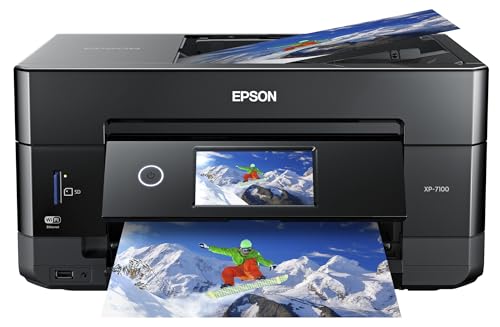
Epson Expression Premium XP-7100 Wireless Color All-in-One Inkjet Printer | 5-color print, scan, copy; up to 15.8 ppm, ADF, borderless photo printing; ideal for home and photo projects
As an Amazon Associate we earn from qualifying purchases. Product prices and availability are accurate as of the date/time indicated.

HP OfficeJet Pro 8125 Wireless All-in-One Color Inkjet Printer, Print, Scan, Copy, ADF, Duplex Printing Best-for-Home Office, 3 Month Trial of Instant Ink Included, AI-Capable (C2VJ4A)
As an Amazon Associate we earn from qualifying purchases. Product prices and availability are accurate as of the date/time indicated.

Canon MegaTank G3270 All-in-One Wireless Color Printer | Print, Copy, Scan, Refillable Tank System, Compact Desktop Design, Home & Office Use
As an Amazon Associate we earn from qualifying purchases. Product prices and availability are accurate as of the date/time indicated.
Prices shown are approximate and for reference only. Prices change often, so please check the current price on Amazon before you buy.
Best Premium All in One Printer for Office in 2026: Detailed Reviews
1. HP Color LaserJet Pro MFP M479fdw — Best Overall Premium All in One Printer for Office
The M479fdw is a colour laser all-in-one that prints, scans, copies, and faxes. It prints 28 pages per minute in both colour and black, which is fast enough for a small office that prints a few hundred pages a day, without being so fast that it needs a large, expensive toner cartridge to keep up. The 50-sheet automatic document feeder handles a standard contract or a stack of invoices without you feeding pages one by one, and the automatic duplex means you can print a double-sided report without flipping pages.
In daily use, the M479fdw is notable for its colour quality. Text is sharp, charts are clean, and colour is consistent from the first page to the last. That matters if you print client-facing documents, proposals, or presentations. The touchscreen is clear, the setup is straightforward, and HP’s driver support for Windows and Mac is reliable. The printer connects by Ethernet, Wi-Fi, and USB, so it works in a shared office and in a home office.
The running cost is the main drawback. Colour laser toner is more expensive than black toner, and the M479fdw uses four cartridges. If you print mostly black text, a black-only laser like the HP 4101fdw will be cheaper to run. If you print colour regularly, the M479fdw is worth the extra cost, because it avoids the need for a separate colour printer.
2. Brother MFC-L8900CDW — Best Premium Colour Laser for a Busy Office
The MFC-L8900CDW is Brother’s faster colour laser all-in-one, at 33 pages per minute in colour and black. It has a 70-sheet automatic document feeder, which is larger than the 50-sheet feeder on most printers here, and that makes a difference when you scan a long document. It also has a larger paper capacity in its standard configuration, so you refill it less often.
For a busy office that prints colour every day, the L8900CDW is a better fit than the M479fdw. It is faster, it holds more paper, and its toner cartridges are larger, so they last longer between changes. The trade-off is size and price: it is larger and heavier than the HP, and it costs $600 to $750, at the top of the range here. It is also a Brother printer, so the driver and software experience is different from HP’s, and some users prefer one over the other. Try the interface if you can, or check that your office’s existing software works with Brother drivers.
3. Canon imageCLASS MF753Cdw — Best Premium Canon Colour Laser for Office
Canon’s MF753Cdw prints 35 pages per minute in colour and black, the fastest colour printer here. It has automatic duplex, a 50-sheet automatic document feeder, and a colour touchscreen. Canon’s imageCLASS line is known for reliable paper handling, and the MF753Cdw is no exception: it jams less often than many colour lasers when printing on heavier paper or on envelopes.
The MF753Cdw is a good choice if you print on different paper types, or if you need a printer that can handle a mix of plain paper, letterhead, and card stock. It is priced at $500 to $650, similar to the HP M479fdw, but faster. The downside is toner cost and availability: Canon toner is widely available, but it is not the cheapest, and the printer is a little louder than the HP when it is printing a long job. For a small office that values speed and paper handling, it is a strong alternative to the HP.
4. Epson EcoTank Pro ET-5850 — Best Premium Ink Tank All in One for Low Running Costs
The ET-5850 is different from the laser printers above. It is an ink tank printer, not a laser, and it uses refillable ink tanks instead of cartridges. That makes its running cost much lower, especially for colour printing, because a bottle of ink prints thousands of pages. It prints 25 pages per minute in black, which meets our premium bar, but only 12 pages per minute in colour, which is slower than the colour lasers here. That is a trade-off you need to understand before you buy it.
For an office that prints a lot of colour — for example, a design office, a school, or a small business that prints flyers and photos — the ET-5850 can save a lot on ink over a year. It has automatic duplex, a 50-sheet automatic document feeder, and a large touchscreen. It also has a fax function and Ethernet and Wi-Fi. The downside, apart from slower colour speed, is that ink tank printers need more maintenance than lasers: you need to keep the ink flowing, and you need to print regularly to avoid clogged nozzles. If you print every day, that is not a problem. If you print once a week, a laser is a better choice.
5. HP LaserJet Pro MFP 4101fdw — Best Premium Black-Only All in One for Office
The 4101fdw is a black-only laser all-in-one that prints 42 pages per minute, the fastest black printer here. It has automatic duplex, a 50-sheet automatic document feeder, and it prints, scans, copies, and faxes. If your office prints mostly black text — contracts, invoices, reports, and internal documents — a black-only laser is cheaper to buy and cheaper to run than a colour laser, because it uses only one toner cartridge.
At $400 to $550, it is the cheapest printer here, and it is also the fastest for black printing. The trade-off is obvious: it does not print in colour. If you need colour even once a week, you will need a second printer or a colour printer instead. For a law office, an accounting office, or any office that prints mostly text, the 4101fdw is the most efficient choice.
6. Brother MFC-L5710DW — Best Premium Brother Black-Only All in One for Office
Brother’s MFC-L5710DW is the Brother equivalent of the HP 4101fdw: a black-only laser all-in-one that prints 42 pages per minute, with automatic duplex and a 50-sheet automatic document feeder. It prints, scans, copies, and faxes, and it connects by Ethernet, Wi-Fi, and USB.
The L5710DW is a good choice if you already use Brother printers in your office and you want to keep the same toner and drivers. It is priced at $400 to $550, similar to the HP 4101fdw, and it is slightly larger. The rating is a little lower, at 4.3 out of 5, mainly because Brother’s software is less polished than HP’s, and the touchscreen is smaller. For pure black printing speed and reliability, it is equal to the HP. Choose it if you prefer Brother, or if you find it at a better price than the HP.
Best Premium All in One Printer for Office Buying Guide
Choosing a premium office printer is about total cost, not just purchase price. A cheap printer with expensive toner can cost more over two years than a more expensive printer with cheap toner. A fast printer that jams often can cost more in lost time than a slower printer that just works.
Laser or Ink Tank, Colour or Black: Matching the Printer to Your Office
Laser printers are best for offices that print mostly text, that print intermittently, and that want sharp text and fast first-page times. A laser printer can sit unused for a week and print perfectly the next time you use it, because toner is a dry powder and does not dry out. Ink tank printers are best for offices that print a lot of colour every day, and that want the lowest cost per page for colour. An ink tank printer that sits unused can clog, so it needs regular use.
Colour or black is a business decision. If you print colour for clients, for presentations, or for marketing, buy a colour laser. If you print black for internal documents and you outsource colour printing, buy a black-only laser and save the money. Do not buy a colour printer and then print only in black, as you will still pay for colour toner maintenance and for a more expensive printer.
Speed, Duplex, and Document Feeder: The Three Features That Save Time in an Office
Print speed should be at least 20 pages per minute for a laser printer in an office, and at least 25 pages per minute for a premium printer. All six printers here meet that, with speeds from 25 to 42 pages per minute. The difference between 28 and 35 pages per minute is noticeable on a 50-page report, but it is not as important as paper handling and reliability.
Automatic duplex printing is essential in an office. It saves paper, it makes reports look professional, and it saves time because you do not have to flip pages manually. All six printers here have automatic duplex. Check that the duplex works for the paper weight you use, as some printers only duplex on plain paper up to a certain weight.
An automatic document feeder is essential for scanning and copying. A 50-sheet feeder is enough for most offices. A 70-sheet feeder, like the one on the Brother MFC-L8900CDW, is better if you scan long contracts regularly. Check that the feeder can scan both sides in one pass, or if it flips the page, as that affects speed.
Running Costs, Paper Capacity, and Network: What a Premium Printer Costs Over Two Years
Check the cost per page for black and for colour, not just the price of the printer. A colour laser that costs $500 to $650 can cost $0.10 to $0.15 per colour page in toner, while an ink tank printer can cost $0.02 to $0.05 per colour page. Over 10,000 colour pages, that difference is hundreds of dollars. For black, a laser is usually $0.02 to $0.04 per page, which is cheaper than most inkjets.
Paper capacity matters in a shared office. A printer with a 250-sheet tray will need refilling every day in a busy office, while a printer with a 500-sheet capacity, or an optional second tray, will need refilling less often. Check the maximum paper capacity, not just the standard capacity, and consider a second tray if you print on letterhead and plain paper.
Network matters for a shared printer. All six printers here connect by Ethernet and Wi-Fi, and they support mobile printing. Check that the printer works with your office’s network security, and that it supports the driver for your computers. A printer that does not work with your network is not a premium printer, no matter how fast it is.
Best Premium All in One Printer for Office FAQ
What is the best premium all in one printer for office?
The best premium all in one printer for office is the HP Color LaserJet Pro MFP M479fdw for most small to medium offices, because it prints 28 pages per minute in colour and black, has automatic duplex and a 50-sheet automatic document feeder, and costs $500 to $650. The Brother MFC-L8900CDW is the best faster colour alternative at 33 pages per minute and $600 to $750, with a 70-sheet feeder. The HP LaserJet Pro MFP 4101fdw is the best black-only alternative at 42 pages per minute and $400 to $550, if you print mostly black text.
Should I buy a laser or an ink tank printer for my office?
Buy a laser printer if you print mostly text, if you print intermittently, and if you want sharp text and no clogging when the printer sits unused. Buy an ink tank printer like the Epson EcoTank Pro ET-5850 if you print a lot of colour every day and you want the lowest cost per colour page. The ET-5850 prints 25 pages per minute in black but only 12 pages per minute in colour, so it is slower for colour than a colour laser, and it needs regular use to avoid clogged nozzles.
How fast should a premium office printer be?
A premium office printer should print at least 25 pages per minute, with automatic duplex printing and an automatic document feeder. All six printers in this guide meet that, with speeds from 25 to 42 pages per minute. The HP Color LaserJet Pro MFP M479fdw prints 28 pages per minute, the Canon imageCLASS MF753Cdw prints 35 pages per minute, and the HP LaserJet Pro MFP 4101fdw and Brother MFC-L5710DW print 42 pages per minute in black. Speed matters for long reports, but paper handling and reliability matter more for daily use.
Do I need colour in a premium office printer?
You need colour if you print for clients, for presentations, or for marketing, and you need it regularly. If you print colour only once a week, a colour laser is still worth it if you want to avoid outsourcing. If you print black for contracts, invoices, and internal documents, and you outsource colour, a black-only laser like the HP LaserJet Pro MFP 4101fdw at $400 to $550 will be cheaper to buy and cheaper to run, because it uses only one toner cartridge.
FAQ
What is the best premium all in one printer for office?
Should I buy a laser or an ink tank printer for my office?
How fast should a premium office printer be?
Do I need colour in a premium office printer?
Related guides
- Best Mini Drone for Office Travel in 2026: Under the Registration Threshold, Quiet Enough for a Hotel Courtyard, and Packed in the Same Bag as the Laptop
- Best USB Flash Drive vs Portable SSD for Offices in 2026: 7 USB Flash Drives and Portable SSDs Compared for Speed, Capacity, and Reliable Office Storage
- Best High End Tablet for Photographers in 2026: Best High End Tablet for Photographers
- Best Small Router for Tiny Apartments in 2026: Best Small Router for Tiny Apartments
More from Amazon
Programs that pair well with the guide above. Offers and eligibility are set by Amazon and may change.
Free shipping on eligible items, Prime Video and more. Eligible new members can start with a free trial.
Start a Prime free trialAd-free music streaming. Eligible new subscribers can start with a free trial.
Try Music Unlimited freeA Prime membership for ages 18-24 with a trial period. Eligibility is set by Amazon.
See Prime for Young AdultsAudiobooks and podcasts to listen to on the go. Eligible new members can start with a free trial.
Try Audible freeAs an Amazon Associate we earn from qualifying purchases.

Write Your Review
No reviews yet. Be the first to share your experience!