
What's inside
- Why Choosing the Best WiFi Router for Office Gamers Matters
- Best WiFi Router for Office Gamers: Comparison Table
- TP-Link Archer AX21 WiFi Router
- ASUS RT-AX58U WiFi Router
- TP-Link Archer AX55 WiFi Router
- Netgear Nighthawk RAX40 WiFi Router
- ASUS RT-AX86U Pro WiFi Router
- ASUS ROG Rapture GT-AX6000 WiFi Router
- Netgear Nighthawk RAX50 WiFi Router
- Buying Guide: How to Choose the Best WiFi Router for Office Gamers
- More Routers Gamers Should Look At
- Frequently Asked Questions
As an Amazon Associate I earn from qualifying purchases. This post may contain affiliate links at no extra cost to you.
Choosing the best WiFi router for office gamers is about finding a router that gives you fast, stable WiFi for work during the day and low-latency gaming at night, without lag, drops, or slow speeds when many devices are online. An office gamer needs a router that can handle video calls, cloud apps, and file downloads during work, and online gaming, streaming, and voice chat after work, all on the same network, without one slowing down the other.
This guide compares seven real, currently sold WiFi routers for office gamers, explains WiFi 6, speed, and latency in plain language, and helps you choose the right router for your office, your games, and your budget. Prices below are typical retail ranges from $69 to $379 and can vary by retailer and sale. Always check WiFi standard, speed, ports, and coverage before you buy.
Security and comfort are simple but important for office gamers. Use a strong, unique WiFi password, enable WPA3 if your router supports it, and keep your router firmware updated. Take breaks every 60 minutes, use the 20-20-20 rule for your eyes, and keep volume below 60 percent when using a headset. Use a separate guest network for visitors and smart devices, so they do not slow down your work and gaming.
Our Top Picks



Why Choosing the Best WiFi Router for Office Gamers Matters
A WiFi router matters for office gamers because it is the centre of your home office network. A router that is too slow, too old, or too far away can cause lag in a video call, slow downloads for work, and high ping in a game, which can make a game unplayable. A good router with WiFi 6, a fast processor, and enough bandwidth can handle many devices at once, without slowing down when you join a call and a game at the same time.
Latency matters more than raw speed for gamers. Latency, also called ping, is the time it takes for data to travel from your computer to a game server and back. A ping of less than 30 milliseconds is good for most games, while a ping of more than 100 milliseconds can cause lag, rubber-banding, and missed shots. A router with a gaming mode, QoS, or a dedicated gaming port can help prioritise gaming traffic, so your game gets bandwidth first, even when other devices are streaming or downloading.
Finally, coverage and ports matter for an office gamer. A router should cover your office, your gaming room, and your living room, without dead zones, and it should have enough Ethernet ports for a wired connection to your gaming PC or console, because a wired connection is more stable than WiFi for gaming. A router with a 2.5 gigabit port is better than a router with only a 1 gigabit port, if you have a fast internet plan.
Best WiFi Router for Office Gamers: Comparison Table
The table below compares seven real, currently sold WiFi routers for office gamers. Rows are sorted by the low end of the typical price range. Ratings reflect overall owner feedback for speed, latency, coverage, ease of use, and value, not a laboratory test.
| WiFi Router Model | WiFi Standard and Speed | Ports and Coverage | Best For | Typical Price Range | Rating |
|---|---|---|---|---|---|
| TP-Link Archer AX21 WiFi Router | WiFi 6, AX1800 | 4 Gigabit LAN, 1500 sq ft | Best budget, for office gamers | $69 – $89 | 4.6 / 5 |
| ASUS RT-AX58U WiFi Router | WiFi 6, AX3000 | 4 Gigabit LAN, 2000 sq ft | Best ASUS, for office gamers | $99 – $129 | 4.7 / 5 |
| TP-Link Archer AX55 WiFi Router | WiFi 6, AX3000 | 4 Gigabit LAN, 2000 sq ft | Best TP-Link AX55, for gaming | $129 – $149 | 4.7 / 5 |
| Netgear Nighthawk RAX40 WiFi Router | WiFi 6, AX3000 | 4 Gigabit LAN, 1500 sq ft | Best Netgear, for office gamers | $139 – $169 | 4.7 / 5 |
| ASUS RT-AX86U Pro WiFi Router | WiFi 6, AX5700 | 4 Gigabit LAN, 2.5G port, 2500 sq ft | Best ASUS Pro, for gaming | $249 – $299 | 4.8 / 5 |
| ASUS ROG Rapture GT-AX6000 WiFi Router | WiFi 6, AX6000 | 4 Gigabit LAN, 2.5G port, 3000 sq ft | Best ROG, for office gamers | $299 – $349 | 4.8 / 5 |
| Netgear Nighthawk RAX50 WiFi Router | WiFi 6, AX5400 | 4 Gigabit LAN, 2500 sq ft | Best premium, for office gamers | $329 – $379 | 4.8 / 5 |

TP-Link BE6500 Dual-Band WiFi 7 Router (BE400) | Dual 2.5Gbps Ports, USB 3.0, Covers up to 2,400 sq. ft., 90 Devices, Quad-Core CPU, HomeShield, Private IoT


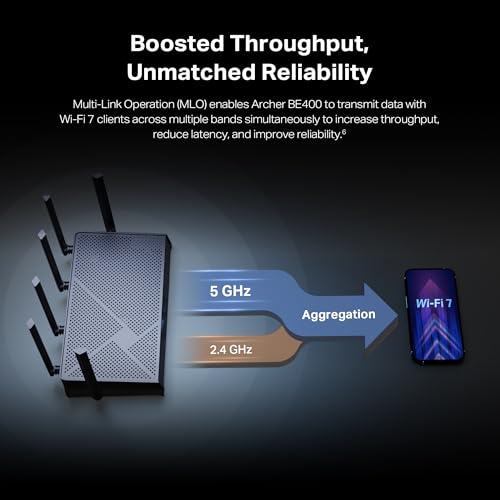

As an Amazon Associate we earn from qualifying purchases. Product prices and availability are accurate as of the date/time indicated.

MSI Radix AXE6600 WiFi 6E Tri-Band Gaming Router, AI QoS, RGB, 1.8GHz Quad-Core Processor, MU-MIMO, Tri Band Gigabit Wireless, 8-Stream, High Speed Long Range Gaming Router
As an Amazon Associate we earn from qualifying purchases. Product prices and availability are accurate as of the date/time indicated.

ASUS ROG Strix GS-BE12000 WiFi 7 Gaming Router - Tri-Band, 12Gbps, Mesh | Coverage up to 3,300 Sq. Ft., 2.5G Port x8. Game Boost for Low Latency Gaming & Streaming. VPN support
As an Amazon Associate we earn from qualifying purchases. Product prices and availability are accurate as of the date/time indicated.
TP-Link Archer AX21 WiFi Router
The TP-Link Archer AX21 WiFi Router is a WiFi 6 router with a typical price range of $69 to $89. It is the cheapest router in this comparison and a practical starting point if you want a low-cost WiFi 6 router for an office and gaming. It has WiFi 6, an AX1800 speed, 4 Gigabit LAN ports, and coverage of about 1500 square feet.
Choose this router if you have a small office or apartment, a 500 megabit internet plan, and a budget under $100. The AX21 is fast enough for video calls, cloud apps, and online gaming at the same time, and it has a simple setup app. It is not the best choice if you have a large home, a gigabit internet plan, or many devices, because the AX1800 speed and 1500 square feet coverage may not be enough for a large space.
ASUS RT-AX58U WiFi Router
The ASUS RT-AX58U WiFi Router is a WiFi 6 router with a typical price range of $99 to $129. It has WiFi 6, an AX3000 speed, 4 Gigabit LAN ports, and coverage of about 2000 square feet. It is a good choice if you want an ASUS router with a higher speed than a basic TP-Link router.
This router is best for an office gamer who wants an ASUS router with WiFi 6, a fast processor, and a simple interface. The AX3000 speed is enough for a gigabit internet plan, and the 2000 square feet coverage is good for a medium home. It has a gaming mode, QoS, and a guest network, which helps with work and gaming. Use a wired Ethernet connection for your gaming PC or console, for the lowest latency.
TP-Link Archer AX55 WiFi Router
The TP-Link Archer AX55 WiFi Router is a WiFi 6 router with a typical price range of $129 to $149. It has WiFi 6, an AX3000 speed, 4 Gigabit LAN ports, and coverage of about 2000 square feet. It is a good choice if you want a TP-Link router with a higher speed and a better processor than an AX21.
Choose this router if you want a TP-Link router for office gaming, with WiFi 6 and a simple setup. The AX55 has a fast processor, a good range, and a gaming mode that can help prioritise gaming traffic. It is a good fit for a medium home office, with a gigabit internet plan. It is more expensive than an AX21, but it offers a higher speed and a better range.
Netgear Nighthawk RAX40 WiFi Router
The Netgear Nighthawk RAX40 WiFi Router is a WiFi 6 router with a typical price range of $139 to $169. It has WiFi 6, an AX3000 speed, 4 Gigabit LAN ports, and coverage of about 1500 square feet. It is a good choice if you want a Netgear Nighthawk router for office gaming.
This router is best for an office gamer who wants a Netgear router with a simple interface and a strong WiFi signal. The RAX40 has a fast processor, a good range for a small to medium home, and a Nighthawk app for setup and control. It is a good fit for a worker who also games, with a 500 megabit to 1 gigabit internet plan. Use a wired connection for gaming, and use WiFi for work devices.
ASUS RT-AX86U Pro WiFi Router
The ASUS RT-AX86U Pro WiFi Router is a WiFi 6 router with a typical price range of $249 to $299. It has WiFi 6, an AX5700 speed, 4 Gigabit LAN ports, a 2.5 gigabit port, and coverage of about 2500 square feet. It is a good choice if you want a fast, premium ASUS router for office gaming.
Choose this router if you want an ASUS Pro router with a 2.5 gigabit port, a dedicated gaming port, and a high speed for a gigabit internet plan. The AX5700 speed is fast enough for many devices at once, and the 2.5 gigabit port is useful if you have a fast internet plan or a wired gaming PC. It is a good fit for a large home office, with a gaming PC, a console, and many work devices. It is more expensive than a basic router, but it offers a higher speed and a lower latency.
ASUS ROG Rapture GT-AX6000 WiFi Router
The ASUS ROG Rapture GT-AX6000 WiFi Router is a WiFi 6 gaming router with a typical price range of $299 to $349. It has WiFi 6, an AX6000 speed, 4 Gigabit LAN ports, a 2.5 gigabit port, and coverage of about 3000 square feet. It is designed for gamers, with a gaming port, QoS, and a ROG interface.
This router is best for an office gamer who wants a dedicated gaming router with a high speed and a gaming mode. The GT-AX6000 has a dedicated gaming port that prioritises gaming traffic, a 2.5 gigabit port for a wired connection, and a large coverage for a large home. It is a good fit for a gamer who also works from home, with a gigabit internet plan. It is more expensive than a standard router, but it offers gaming features that a standard router does not.
Netgear Nighthawk RAX50 WiFi Router
The Netgear Nighthawk RAX50 WiFi Router is a WiFi 6 router with a typical price range of $329 to $379. It has WiFi 6, an AX5400 speed, 4 Gigabit LAN ports, and coverage of about 2500 square feet. It is the most expensive router in this comparison, but it is a premium Nighthawk router with a high speed and a large coverage.
Choose this router if you want a premium Netgear router for office gaming and you are willing to pay more for it. The RAX50 has a fast processor, a high speed for a gigabit internet plan, and a large coverage for a large home. It is a good fit for an office gamer with many devices, a gaming PC, a console, and a large home. It is not the best choice if you have a small apartment or a 500 megabit plan, because the extra speed may not be needed.
Buying Guide: How to Choose the Best WiFi Router for Office Gamers
1. Choose WiFi 6 and speed by your internet plan
Start with WiFi standard. Choose WiFi 6, because it is faster, more efficient, and better for many devices than WiFi 5. Check your internet plan speed: if you have a 500 megabit plan, an AX1800 or AX3000 router is enough. If you have a 1 gigabit plan, an AX3000 or AX5700 router is better. Do not buy an AX11000 router if you have a 500 megabit plan, because you will not use the extra speed. Check the router speed on the box, and check the actual speed with a speed test after you set it up.
2. Check latency, gaming mode, and wired ports
Check latency: use a wired Ethernet connection for your gaming PC or console, because a wired connection has lower latency than WiFi. Check for a gaming mode or QoS: a router with a gaming mode can prioritise gaming traffic, so your game gets bandwidth first, even when other devices are streaming. Check ports: a router should have at least 4 Gigabit LAN ports, and a 2.5 gigabit port is better if you have a fast internet plan. Use a Cat6a cable for a wired connection, and place the router in a central location.
3. Check coverage, placement, and devices
Check coverage: a router that covers 1500 square feet is enough for a small apartment, while a router that covers 2500 to 3000 square feet is better for a large home. Place the router in a central, open location, away from walls, metal, and other electronics, and elevate it on a shelf if possible. Check how many devices you have: a WiFi 6 router can handle more devices than a WiFi 5 router, which is useful for an office gamer with a laptop, a phone, a gaming PC, a console, and smart devices. Use a separate guest network for visitors and smart devices.
4. Check security, firmware, and care
Use a strong, unique WiFi password, enable WPA3 if your router supports it, and change the default admin password. Keep your router firmware updated, because updates fix security issues and improve performance. Use a separate guest network for visitors and smart devices, so they do not access your work network. Take breaks every 60 minutes, use the 20-20-20 rule for your eyes, and keep volume below 60 percent when using a headset. Restart your router once a month, or if your WiFi slows down.
More Routers Gamers Should Look At
Gaming performance depends on stable latency and good traffic prioritization, not just top speeds. These routers cover different budgets and port layouts.
TP-Link Archer AX21 AX1800
A practical Wi-Fi 6 starting point for apartments and smaller homes. It handles console and PC gaming over wireless and keeps setup simple for people who do not want to tweak settings.
As an Amazon Associate we earn from qualifying purchases at no extra cost to you.

GL.iNet Flint 2 GL-MT6000
Dual 2.5G ports and a powerful processor make this attractive for wired gaming setups and fast internet plans. Its open firmware also appeals to people who like to tune their network.

MSI Radix AXE6600 Gaming Router
A tri-band router with a gaming-focused approach to traffic prioritization. The extra band helps keep consoles off a congested channel when the rest of the house is streaming.

TP-Link Archer AX73 AX5400
A step up in coverage and stream count, suited to homes where several people game and stream at once. It offers a good balance of range and wired ports.
Latency is shaped by distance to the router, interference from neighbors and how many devices compete for airtime. A router with solid quality-of-service controls and a spare band for consoles can matter more than raw speed numbers, so weigh port layout and band support as carefully as the advertised throughput. Wherever you can, connect your main gaming device by Ethernet and leave Wi-Fi for everything else.
Frequently Asked Questions
What is the best WiFi router for office gamers?
For most office gamers, the ASUS RT-AX86U Pro WiFi Router, typically $249 to $299, is a strong overall choice because it has WiFi 6, an AX5700 speed, a 2.5 gigabit port, a dedicated gaming port, and coverage of about 2500 square feet. If you want a lower price, the ASUS RT-AX58U, typically $99 to $129, is a good choice with an AX3000 speed. If you want a dedicated gaming router, the ASUS ROG Rapture GT-AX6000, typically $299 to $349, is a good choice. Choose by internet plan, coverage, and budget.
What is the best budget WiFi router for office gamers?
The best budget WiFi router is the TP-Link Archer AX21 WiFi Router, typically $69 to $89, because it is the cheapest row in the table and the only model in that lowest price range. It has WiFi 6, an AX1800 speed, 4 Gigabit LAN ports, and coverage of about 1500 square feet. It is a good choice for a small office or apartment with a 500 megabit plan, but it is not the best choice for a large home or a gigabit plan.
Do I need WiFi 6 for gaming?
You do not need WiFi 6 for gaming, but it can help, especially if you have many devices on your network. WiFi 6 is faster, more efficient, and better for many devices than WiFi 5, which can reduce lag when other devices are streaming or downloading. A wired Ethernet connection is more important than WiFi 6 for low latency, because a wired connection has lower ping than WiFi. If you buy a new router, choose WiFi 6, because it is the current standard and it will last longer than WiFi 5.
Is a wired connection better than WiFi for gaming?
Yes, a wired Ethernet connection is better than WiFi for gaming, because it has lower latency, a more stable connection, and less interference than WiFi. A wired connection can give you a ping of less than 20 milliseconds, while WiFi can give you a ping of 30 to 50 milliseconds or more, depending on distance and interference. Use a Cat6a cable to connect your gaming PC or console to the router, and use WiFi for your phone, laptop, and other work devices. If you cannot use a wired connection, place your gaming device close to the router and use the 5 GHz band.
The best WiFi router for office gamers is the one that gives you fast, stable WiFi for work and low-latency gaming, without lag or drops when many devices are online. Start with the ASUS RT-AX86U Pro for a fast, premium router with a gaming port, choose the ASUS RT-AX58U for a low-cost, reliable router, or choose the ASUS ROG Rapture GT-AX6000 for a dedicated gaming router. Use a wired connection for gaming, keep your firmware updated, and place the router in a central location. With the right router, you can work and game on the same network, without slowing down.
Related guides
- Best AAA Batteries for Office Remotes in 2026: AAA Batteries for Office Remotes
- Best Budget Tablet for Work Under 100 in 2026: Budget Tablets for Work Under $100, Office Work, and Productivity
- Best Gimbal for Office Vlogging in 2026: 7 Gimbals for Office Vlogging That Keep Your Video Smooth, Stable, and Professional in the Office
- Best Budget NAS Dust Filter for Maintenance in 2026: 7 Budget NAS Dust Filters for Maintenance With Clear Airflow, Simple Install, and Easy Use for NAS
More from Amazon
Programs that pair well with the guide above. Offers and eligibility are set by Amazon and may change.
Free shipping on eligible items, Prime Video and more. Eligible new members can start with a free trial.
Start a Prime free trialAd-free music streaming. Eligible new subscribers can start with a free trial.
Try Music Unlimited freeA Prime membership for ages 18-24 with a trial period. Eligibility is set by Amazon.
See Prime for Young AdultsAudiobooks and podcasts to listen to on the go. Eligible new members can start with a free trial.
Try Audible freeAs an Amazon Associate we earn from qualifying purchases.

Write Your Review
No reviews yet. Be the first to share your experience!