
What's inside
- What Makes the Best WiFi 7 Router for Network Engineers Different
- Quick Comparison: Best WiFi 7 Router for Network Engineers Models
- Detailed Reviews: Best WiFi 7 Router for Network Engineers Picks
- Buying Guide: Choosing the Best WiFi 7 Router for Network Engineers
- Frequently Asked Questions About Best WiFi 7 Router for Network Engineers
As an Amazon Associate I earn from qualifying purchases. This post may contain affiliate links at no extra cost to you.
The best WiFi 7 router for network engineers is not the one with the largest number on the box. It is the one that behaves like infrastructure: wired ports fast enough to stop being the bottleneck, firmware that exposes VLANs, firewall rules, and logs instead of hiding them behind a lifestyle app, multi-gigabit backhaul that survives a house or lab full of clients, and management deep enough to debug a problem at the packet’s level rather than by rebooting and hoping. This guide compares real, currently sold WiFi 7 routers and systems from ASUS, NETGEAR, TP-Link, Ubiquiti, and GL.iNet through an engineer’s checklist, because the audience for this article tests networks for a living or runs a home lab that amounts to the same thing, and judges a router by what it reveals and what it lets them configure.
Set the WiFi 7 baseline honestly first. The standard’s headline features, in the Wi-Fi Alliance’s and the makers’ terms, are wider 320MHz channels on 6GHz, 4096-QAM modulation, and Multi-Link Operation, which lets a client use multiple bands at once in the modes each implementation supports. Their real-world value depends entirely on the environment: 320MHz channels need clean 6GHz spectrum and a client that supports them, MLO’s behaviour varies by implementation and firmware maturity, and in a congested apartment building a well-configured WiFi 6E network can outperform a careless WiFi 7 one. An engineer reads this guide accordingly: the radios get a network into the room, and the platform, ports, firmware, and telemetry in the rows below decide whether it can be engineered once it is there.
Prices are typical retail ranges, and specifications, port speeds and counts, radio configurations, and stated feature sets, are each maker’s details for the current hardware version and firmware generation, so confirm them on the exact listing before you buy, because this category revises hardware under one model name more than any other in networking.
Our Top Picks
What Makes the Best WiFi 7 Router for Network Engineers Different
Ports and Throughput: The Wired Side Is the Professional Side
An engineer’s router is a wired device that also does wireless. The port questions come first: how many multi-gigabit LAN ports, at 2.5GbE, 5GbE, or 10GbE in the makers’ stated configurations, whether a 10GbE port is copper, SFP+, or one of each, because SFP+ buys fibre and DAC flexibility that copper cannot, and whether WAN and LAN aggregation in the makers’ terms matches the switching the lab actually runs. A single 10GbE port feeding a 1GbE switch is a photograph, not a network; the rows below earn their ratings partly on whether their wired side can serve a NAS, a workstation, and an access point backhaul at full speed simultaneously. Stateful firewall and NAT throughput at those port speeds, VPN throughput for the WireGuard and OpenVPN servers in the makers’ feature lists, and hardware acceleration behaviour under the features an engineer enables, QoS, traffic analysis, intrusion features in the respective platforms, complete the wired audit, because a router that is fast only with its features off is a router whose specification describes a different product.
Firmware and Control: VLANs, Rules, Logs, and a Way Out
The professional firmware checklist is specific. VLAN support on LAN and on SSIDs, so the lab, the household, the IoT estate, and the guests live on separate broadcast domains. A firewall an administrator can actually write rules in, not a toggle. DNS control, per-client and per-network, with the platform’s stated filtering and forwarding options. Logs and statistics that persist and export, traffic analysis per client in the platforms that offer it, and a syslog or equivalent path in the makers’ terms for the engineer who runs real monitoring. Command line or API access where the platform offers it, ASUS’s and GL.iNet’s openness in their respective designs being the consumer-side examples, and Ubiquiti’s controller model being the managed example. And the exit test: bridge and access point modes that work cleanly, so the box can be demoted into the network rather than discarded when a dedicated firewall arrives, because in an engineer’s home the router is a role that migrates, and hardware that can follow the migration keeps its value.
Wireless Engineering: Radios, MLO, and Manageability
On the wireless side the engineer’s questions are a surveyor’s. Radio configuration per model in the makers’ terms, tri-band or quad-band, the 6GHz radio’s channel width support, and whether band steering and client steering behave predictably or can be taken under manual control, because a professional would rather pin a fixed infrastructure client to a band and channel than argue with an algorithm. Multi-Link Operation should be evaluated as the implementation stands in current firmware, its supported modes in the maker’s documentation, not as the standard’s brochure describes it, and the same applies to 320MHz channels, which an engineer enables after a spectrum survey, not before one. Mesh behaviour matters where the deployment needs it: wired backhaul support and its priority behaviour, per-node control, and the platform’s handling of a mixed wired and wireless topology, in the respective makers’ systems. The strongest wireless feature in this guide is not a radio at all; it is telemetry, per-client signal, retry, and airtime information in the platforms that expose it, because that is what turns a complaint about slow WiFi into a diagnosis.
Quick Comparison: Best WiFi 7 Router for Network Engineers Models
| Model | Key Specs in Maker’s Terms | Engineering Strength | Typical Price Range | Rating |
|---|---|---|---|---|
| ASUS ROG Rapture GT-BE98 Pro class | Quad-band WiFi 7, dual 10GbE class ports and multi-gig LAN in maker’s configuration, AiMesh | Deepest consumer firmware control, VLAN and gaming and lab features | $600 – $750 | 4.7 / 5 |
| ASUS RT-BE96U class | Tri-band WiFi 7, 10GbE and 2.5GbE class ports in maker’s configuration | GT platform’s control at a lower tier, AiMesh node options | $400 – $550 | 4.6 / 5 |
| NETGEAR Nighthawk RS700S class | Tri-band WiFi 7, 10GbE WAN class and multi-gig LAN in maker’s configuration | Fast wired core, simpler firmware philosophy | $450 – $600 | 4.4 / 5 |
| TP-Link Archer BE800 class | Tri-band WiFi 7, dual 10GbE class ports, SFP+ in maker’s configuration | Best port flexibility per dollar, fibre and copper paths | $450 – $600 | 4.5 / 5 |
| Ubiquiti UniFi Express 7 / U7 Pro ecosystem class | WiFi 7 gateway and access point system in maker’s UniFi platform, 10GbE class uplinks by model | Controller management, telemetry, VLAN and site discipline | $200 – $500 by configuration | 4.6 / 5 |
| GL.iNet Flint 3 GL-BE9300 class | Tri-band WiFi 7, multi-gig ports in maker’s configuration, OpenWrt based platform in maker’s terms | Openness, VPN performance focus, tinker and travel lab use | $150 – $220 | 4.4 / 5 |

Ubiquiti Networks Dream Router Wi-Fi 7 (UDR7)


As an Amazon Associate we earn from qualifying purchases. Product prices and availability are accurate as of the date/time indicated.

TP-Link BE6500 Dual-Band WiFi 7 Router (BE400) | Dual 2.5Gbps Ports, USB 3.0, Covers up to 2,400 sq. ft., 90 Devices, Quad-Core CPU, HomeShield, Private IoT


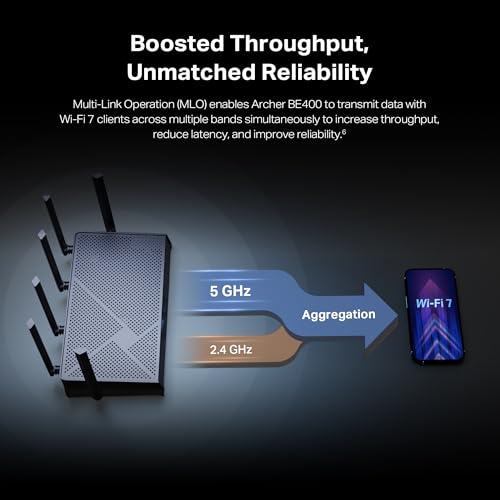

As an Amazon Associate we earn from qualifying purchases. Product prices and availability are accurate as of the date/time indicated.

ASUS RT-BE9700 WiFi 7 Router - Tri-Band (6GHz), 9.7 Gbps, x2 WAN, Mesh | Coverage up to 2,500 Sq. Ft., Subscription Free Network Security, Parental Controls Included, 2.5G Port x4, VPN support
As an Amazon Associate we earn from qualifying purchases. Product prices and availability are accurate as of the date/time indicated.
Port counts and speeds, radio bands, and feature sets are each maker’s stated specifications for the current hardware version and change between revisions under the same model name, so verify the exact unit and firmware. Price ranges are typical retail ranges; the Ubiquiti row is a system whose total depends on the gateway and access points chosen. Ratings are editorial ratings for network engineers: wired capability, firmware depth and openness, telemetry, wireless control, and value in a lab or professional home.
Detailed Reviews: Best WiFi 7 Router for Network Engineers Picks
1. ASUS ROG Rapture GT-BE98 Pro Class – Best WiFi 7 Router for Network Engineers Overall
The GT-BE98 Pro class is the consumer router an engineer can respect: quad-band WiFi 7 with a dedicated band that mesh deployments in its AiMesh system can use for backhaul, a wired side in its maker’s configuration with dual 10GbE class ports and further multi-gig LAN, and the deepest firmware in the consumer market, VLANs, extensive firewall and VPN options, traffic analysis, and system logs in its maker’s interface, on a platform with a long community and vendor record of feature updates. Its gaming presentation disguises an infrastructure instrument, and its price announces one. For a single-box answer that a professional will not outgrow in a year, it leads this guide.
2. Ubiquiti UniFi WiFi 7 Ecosystem Class – Best WiFi 7 System for Network Engineers
The UniFi answer is architectural rather than a router: a gateway, switching, and U7 class access points under one controller in its maker’s platform, with the telemetry, VLAN discipline, per-client visibility, and site management that engineers recognise as the professional pattern. Its total cost assembles from parts, its WiFi 7 capability sits in the access points rather than in a single hero box, and its management model, controller hosted in the maker’s arrangements, suits the engineer who thinks in sites and segments. For a home lab that mirrors a production network, or a small office that is one, it is the most defensible purchase in this guide, bought as a system and expanded as one.
3. ASUS RT-BE96U Class – Best Value ASUS WiFi 7 Router for Network Engineers
The RT-BE96U class keeps the platform virtues of its flagship sibling, ASUS’s firmware depth, AiMesh expansion, VLAN and VPN features in its maker’s terms, on a tri-band radio set and a wired configuration with 10GbE and 2.5GbE class ports in its maker’s specification, at a materially lower price. It surrenders the fourth band and some wired abundance, and for a single residence or a lab that does not mesh across a large property, the surrender is invisible. Engineers who want the ASUS control set without the flagship’s invoice should start here, and the AiMesh path lets the same purchase become a node in a larger system later.
4. TP-Link Archer BE800 Class – Best WiFi 7 Router Ports for Network Engineers
The BE800 class leads on physical flexibility: dual 10GbE class connectivity in its maker’s configuration including an SFP+ path that takes fibre or a DAC to a serious switch, a tri-band WiFi 7 radio set, and a price that undercuts the flagship rows it competes with on hardware. Its firmware, in TP-Link’s current platform terms, is capable and improving, and stands a step behind ASUS’s depth and UniFi’s management in the controls and telemetry this audience inspects first. An engineer whose design starts from the wired core and treats the router as a fast edge with good radios will find it the sharpest hardware value in the table.
5. NETGEAR Nighthawk RS700S Class – Best Simple Fast WiFi 7 Router for Network Engineers
The RS700S class is the fast, straightforward flagship: tri-band WiFi 7, a 10GbE class WAN and multi-gig LAN in its maker’s configuration, and NETGEAR’s simpler firmware philosophy, which sets up quickly and exposes less to the administrator than the ASUS and UniFi rows. Some advanced services in NETGEAR’s ecosystem sit behind its subscription arrangements in the maker’s terms, which an engineer should price into the comparison honestly. For a professional who wants speed without a platform to administer, a small office, a relative’s house they support remotely at arm’s length, it is the right kind of simple, bought knowingly.
6. GL.iNet Flint 3 Class – Best Open WiFi 7 Router for Network Engineers
The Flint 3 class is the engineer’s playground: a tri-band WiFi 7 router on GL.iNet’s OpenWrt-based platform in its maker’s terms, with the VPN performance focus and the configuration openness that line is known for, at the lowest price in this table. Its radios and wired set are a class below the flagships, and its firmware rewards the administrator who is comfortable under the surface of a network rather than on it. As a lab router, a travel and site router, a VPN endpoint, or the box on which a junior engineer is allowed to break things safely, it has no rival here, and several of this guide’s readers will buy it alongside a flagship rather than instead of one.
Buying Guide: Choosing the Best WiFi 7 Router for Network Engineers
Design the Network First, Then Choose the Box
Sketch the network before the shopping: the segments it needs, household, lab, IoT, guests, work, the wired devices and their speeds, the NAS and its clients, the switch that will actually distribute the multi-gigabit ports, the access point locations and whether their backhaul is wired, and the internet service’s real speed and the firewall and VPN throughput it demands. Then read the table against the sketch. A design with one fast NAS and wired backhaul is served by the RT-BE96U class; a design mirroring production segmentation belongs on UniFi; a design whose heart is a 10GbE switch wants the BE800’s SFP+ or the GT-BE98 Pro’s ports feeding it. The most common professional error in this category is buying the radio and discovering the platform, VLAN limits, a VPN throughput figure, a port that is WAN-only in the maker’s configuration, that the design needed. The sketch prevents it, and it costs an hour.
Validate Like an Engineer: Survey, Test, and Keep the Receipts
Commission the router as infrastructure. Survey the 6GHz spectrum before enabling the widest channels, place and cable the hardware, and run a wired baseline first, throughput and latency across the LAN and to the internet, so the wireless results have something honest to be compared against. Test WiFi 7 features one at a time, MLO on and off in the current firmware’s stated modes, 320MHz where the survey supports it, and measure with the clients that matter, at the desks and benches that matter, recording the numbers. Configure the segments, the firewall rules, the DNS behaviour, and the remote access you actually intend, export or document the configuration where the platform allows, and set the update policy deliberately, automatic for a relative’s house, manual and scheduled for a lab whose behaviour is itself an experiment. Keep the old router configured as a fallback for the first weeks, because the professional’s rollback plan is the difference between an upgrade and an outage.
Plan the Platform’s Life: Firmware, Support, and the Exit
Judge the purchase over its service life. Check the maker’s firmware history for the line, the cadence and content of past updates being the best available predictor of future ones, the stated support and security update policy where the maker publishes one, and the community and documentation depth that will answer your 11 p.m. question. Prefer the platform whose bridge and access point modes work cleanly, so today’s router becomes tomorrow’s access point when a dedicated firewall or a UniFi gateway takes the edge, and prefer standard features, standard VLANs, standard VPN protocols in the makers’ terms, over proprietary conveniences that bind the design to one vendor’s roadmap. An engineer’s network is never finished; it is only ever between revisions, and the best WiFi 7 router for network engineers is the one that stays useful, visible, and configurable through several of them.
Frequently Asked Questions About Best WiFi 7 Router for Network Engineers
What is the best WiFi 7 router for network engineers?
The ASUS ROG Rapture GT-BE98 Pro class is the best single router: the deepest consumer firmware control, quad-band WiFi 7, and dual 10GbE class ports in its maker’s configuration. The Ubiquiti UniFi WiFi 7 ecosystem is the best system answer, with controller management and telemetry. The TP-Link Archer BE800 class offers the best port flexibility per dollar, the ASUS RT-BE96U class is the value pick inside the ASUS platform, and the GL.iNet Flint 3 class is the best open, OpenWrt-based option for labs and VPN work.
Do network engineers actually need WiFi 7 yet?
Need depends on the clients and the design. WiFi 7’s gains, 320MHz channels and Multi-Link Operation in the standard’s terms, are real where 6GHz spectrum is clean and clients support them, and marginal in a congested building with WiFi 6 clients, which is most buildings today. The stronger reason for an engineer to buy WiFi 7 now is the platform that comes with it: the multi-gigabit ports, current firmware support, and processing headroom in this table. Buy it as infrastructure with a future, configure it with a surveyor’s honesty, and it earns its place before the client fleet catches up.
Router or UniFi system: which should an engineer choose?
Choose the router when the network is one site, one administrator, and a design that fits in one box’s platform: the ASUS rows give VLANs, VPN, firewall control, and mesh expansion with the least ceremony. Choose the UniFi class system when the network mirrors production discipline, multiple access points on wired backhaul, several segments, per-client telemetry, and site management, or when it will grow into switching and cameras in the same platform. The honest dividing line is management model, not radio performance, and engineers who have run a controller rarely go back to a box.
What should I check before buying a WiFi 7 router for a home lab?
Check the wired side against your design: the count and speed of LAN ports, whether a 10GbE port is copper or SFP+ and whether it can serve LAN duty in the maker’s configuration, and the stated firewall and VPN throughput with features enabled. Check the firmware for VLANs on SSID and LAN, writable firewall rules, DNS control, and log export. Check hardware revision and current firmware behaviour for MLO and 320MHz from the maker’s documentation, and confirm bridge and access point modes work, so the box can be demoted rather than discarded when the lab’s edge changes.
Related guides
- Best AAA Batteries for Office Remotes in 2026: AAA Batteries for Office Remotes
- Best Budget Tablet for Work Under 100 in 2026: Budget Tablets for Work Under $100, Office Work, and Productivity
- Best Gimbal for Office Vlogging in 2026: 7 Gimbals for Office Vlogging That Keep Your Video Smooth, Stable, and Professional in the Office
- Best Budget NAS Dust Filter for Maintenance in 2026: 7 Budget NAS Dust Filters for Maintenance With Clear Airflow, Simple Install, and Easy Use for NAS
More from Amazon
Programs that pair well with the guide above. Offers and eligibility are set by Amazon and may change.
Free shipping on eligible items, Prime Video and more. Eligible new members can start with a free trial.
Start a Prime free trialAd-free music streaming. Eligible new subscribers can start with a free trial.
Try Music Unlimited freeA Prime membership for ages 18-24 with a trial period. Eligibility is set by Amazon.
See Prime for Young AdultsAudiobooks and podcasts to listen to on the go. Eligible new members can start with a free trial.
Try Audible freeAs an Amazon Associate we earn from qualifying purchases.

Write Your Review
No reviews yet. Be the first to share your experience!