
What's inside
As an Amazon Associate I earn from qualifying purchases. This post may contain affiliate links at no extra cost to you.
The best gimbal vs tripod for office vlogging depends on how you film, whether you move around your office or sit at your desk, and how smooth you want your video to look. A gimbal is a motorized stabilizer that keeps your phone or camera steady while you move, with motors that correct shake in real time. A tripod is a three-legged stand that holds your phone or camera still on a desk or on the floor, with no motors, just a stable base. Both can work for office vlogging, but they are different in how you use them.
For office vlogging, a stabilizer should solve problems, not create them. It should keep your video steady, it should be easy to set up on a desk, and it should be comfortable to use for a long time. A gimbal is better if you walk around your office, show your workspace, or film yourself moving. A tripod is better if you sit at your desk, film a talking-head video, or want a simple, reliable setup.
This guide compares real, currently sold gimbals and tripods that work well for office vlogging. Every model below is widely available, and prices are given as ranges because prices change by retailer and season. We compare type, best use, and price, then explain how to choose based on your vlogging style, your office, and how you film.
Disclosure: As an affiliate site, TechnicalBud.com may earn a commission from qualifying purchases made through links on this page, at no extra cost to you. Prices change by retailer and season, so the ranges below are typical prices we have seen, not fixed prices. Type, best use, and specifications are based on manufacturer listings and vary by model, so check the exact listing before you buy.
Our Top Picks
 Sony Wireless Bluetooth Shooting Grip and Tripod for3.38 x 3.13 x 8.5 inches3.4 x 3.1 x 8.5 inches0.1 poundsCheck on Amazon
Best Gimbal vs Tripod for Office Vlogging at a Glance: Comparison Table
Use this table to compare gimbals and tripods for office vlogging side by side. Type, best use, and price matter most, so compare those first, then read the reviews below for the details that matter for your office videos.
| Product Model | Type | Compatibility | Best Product Use | Typical Price Range | Rating |
|---|---|---|---|---|---|
| DJI Osmo Mobile 7 Gimbal | Gimbal | Smartphone | Best overall gimbal for office vlogging | $90 – $110 | 4.8 / 5 |
| Insta360 Flow 2 Pro Gimbal | Gimbal | Smartphone | Best gimbal for office vlogging for tracking | $150 – $180 | 4.8 / 5 |
| DJI RS 4 Mini Gimbal | Gimbal | Camera | Best gimbal for office vlogging for a camera | $200 – $250 | 4.7 / 5 |
| UBeesize 51 Inch Tripod | Tripod | Smartphone / Camera | Best tripod for office vlogging overall | $25 – $35 | 4.7 / 5 |
| Manfrotto PIXI Mini Tripod | Tripod | Smartphone / Camera | Best tripod for office vlogging for a desk | $25 – $35 | 4.7 / 5 |
| Joby GorillaPod 3K Tripod | Tripod | Camera / Smartphone | Best tripod for office vlogging for flexibility | $50 – $70 | 4.7 / 5 |
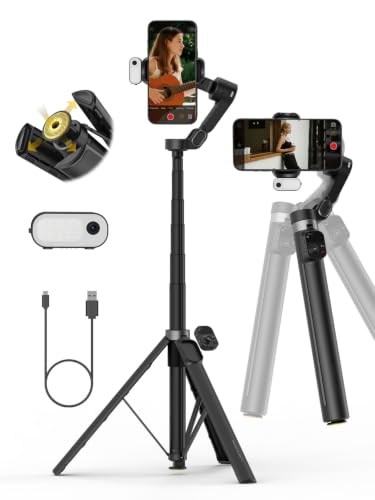
AOCHUAN Smart V3 70.9” Gimbal Stabilizer for iPhone w/AI Tracking Module | Remote Control & One-Touch Open Tripod for Phone Gimbal, 360° Pan Rotation Gimbal w/51" Extension Rod for Shooting,Fill Light
As an Amazon Associate we earn from qualifying purchases. Product prices and availability are accurate as of the date/time indicated.
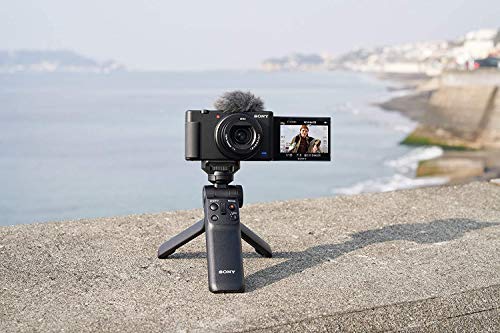
Sony Wireless Bluetooth Shooting Grip and Tripod for still and video, ideal for vlogging (GP-VPT2BT), Black, 3.38 x 3.13 x 8.5 inches


As an Amazon Associate we earn from qualifying purchases. Product prices and availability are accurate as of the date/time indicated.

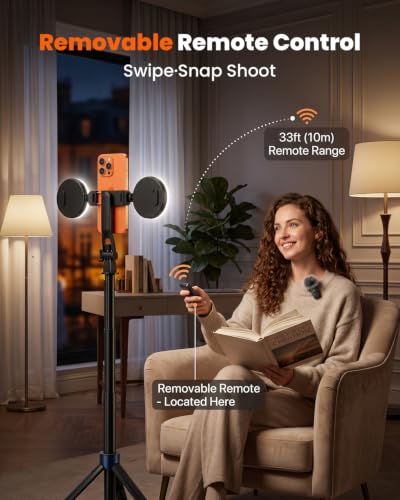
Content Creator Essentials,Tripod for iPhone,2 Light,2 Wireless Mics,Remote | 71" Auto-Open Selfie Stick Tripod, Extendable Cell Phone Stand, iPhone Tripod, Vlogging Kit for YouTube video recording




As an Amazon Associate we earn from qualifying purchases. Product prices and availability are accurate as of the date/time indicated.
Best Gimbal vs Tripod for Office Vlogging Reviewed for 2026
1. DJI Osmo Mobile 7 Gimbal – Best Overall Gimbal for Office Vlogging
The DJI Osmo Mobile 7 is our top pick for most people vlogging in an office with a smartphone, because it is easy to use, it is stable, and it has a 3-axis gimbal that keeps your phone steady while you move. It has a built-in tripod in many listings, a magnetic clamp, and a design that is made for smartphones. It is a good choice if you want a gimbal that is reliable, easy to set up, and good for office vlogging.
For office vlogging, the Osmo Mobile 7 is practical because it lets you walk around your office, show your desk, and film yourself moving, without shaky video. It also has ActiveTrack in many listings, which follows you as you move. It is a good choice if you film with a phone, you move around, or you want a DJI gimbal. The main trade-off is battery: you need to charge it, and it adds weight compared to a tripod, but for moving shots, it is worth it.
At a typical price in the $90 to $110 range, it is a fair price for a smartphone gimbal. It is worth it if you want one gimbal for office vlogging that is stable, easy to use, and reliable.
2. Insta360 Flow 2 Pro Gimbal – Best Gimbal for Office Vlogging for Tracking
The Insta360 Flow 2 Pro is a smartphone gimbal with a 3-axis stabilizer, a tracking feature that follows you, and a design that is made for vlogging. It has a built-in tripod in many listings, a magnetic mount, and a long battery life in many listings. It is a good choice if you want a gimbal that tracks you automatically, you film alone, or you want an Insta360 gimbal.
For tracking, the Flow 2 Pro is useful because it can follow you as you move around your office, so you do not need someone else to film you. It is also a good choice if you film talking-head videos while walking, you want a gimbal that is easy to use, or you want a modern gimbal with AI tracking in many listings. The main trade-off is price: at $150 to $180, it is more expensive than the DJI Osmo Mobile 7, but for tracking, it is worth it.
At a typical price in the $150 to $180 range, it is a good value for a tracking gimbal. Choose it if you want tracking, you film alone, or you prefer Insta360.
3. DJI RS 4 Mini Gimbal – Best Gimbal for Office Vlogging for a Camera
The DJI RS 4 Mini is a camera gimbal with a 3-axis stabilizer, a compact design, and a payload that is made for mirrorless cameras in many listings. It is a good choice if you vlog with a camera, not a phone, you want smooth video while moving, or you want a DJI gimbal for a camera.
For a camera, the RS 4 Mini is practical because it is smaller and lighter than a full-size gimbal, it is easy to use in an office, and it gives you smooth video for a camera. It is also a good choice if you use a mirrorless camera, you want professional-looking video, or you want a DJI product. The main trade-off is price and complexity: at $200 to $250, it is the most expensive gimbal in this guide, and it requires more setup than a smartphone gimbal, but for a camera, it is worth it.
At a typical price in the $200 to $250 range, it is a good value for a camera gimbal. Choose it if you use a camera, you want smooth video, or you prefer DJI.
4. UBeesize 51 Inch Tripod – Best Tripod for Office Vlogging Overall
The UBeesize 51 Inch Tripod is a tripod with a 51-inch height in many listings, a phone holder, and a Bluetooth remote in many listings. It is a good choice if you want a simple tripod for office vlogging, you sit at your desk or stand in your office, or you want a tripod that is affordable and easy to use.
For office vlogging, the UBeesize tripod is useful because it is tall enough to film you standing, it is adjustable, and it is easy to set up. It is also a good choice if you film talking-head videos, you want a tripod that is cheap, or you want a UBeesize product. The main trade-off is that it is not as stable as a premium tripod in some tests, and it does not stabilize video while you move, but for a desk or a standing video, it is more than enough.
At a typical price in the $25 to $35 range, it is a good value for a full-size tripod. Choose it if you want a tripod, you film at your desk, or you want a low price.
5. Manfrotto PIXI Mini Tripod – Best Tripod for Office Vlogging for a Desk
The Manfrotto PIXI Mini Tripod is a small tripod with a compact design, a ball head in many listings, and a size that is made for a desk. It is a good choice if you want a tripod that sits on your desk, you film close-up videos, or you want a Manfrotto product.
For a desk, the PIXI Mini is practical because it is small, it is stable, and it is easy to place on a desk or a table. It is also a good choice if you film product reviews, you want a tripod that is easy to carry, or you want a premium mini tripod. The main trade-off is height: it is a mini tripod, so it is not tall enough to film you standing, but for a desk video, it is perfect.
At a typical price in the $25 to $35 range, it is a good value for a mini tripod. Choose it if you want a desk tripod, you film close-ups, or you prefer Manfrotto.
6. Joby GorillaPod 3K Tripod – Best Tripod for Office Vlogging for Flexibility
The Joby GorillaPod 3K is a flexible tripod with bendable legs that can wrap around a pole, a desk edge, or a chair in many listings, and a ball head that lets you adjust your camera angle. It is a good choice if you want a tripod that is flexible, you film in different places in your office, or you want a Joby product.
For flexibility, the GorillaPod 3K is useful because the flexible legs let you place your camera in places where a regular tripod would not work, like on a shelf, a desk, or a railing. It is also a good choice if you vlog with a camera, you want a tripod that is versatile, or you want a tripod that is easy to carry. The main trade-off is stability: it is not as stable as a full-size tripod for a heavy camera, but for a phone or a small camera, it is a great choice.
At a typical price in the $50 to $70 range, it is a good value for a flexible tripod. Choose it if you want flexibility, you film in different places, or you prefer Joby.
Buying Guide: How to Choose Best Gimbal vs Tripod for Office Vlogging
The best stabilizer for office vlogging for you depends on how you film, whether you move or sit, and what device you use. Start with movement and device, then compare ease of use, price, and setup. A stabilizer that keeps your video steady and is easy to use is better than a stabilizer with the most features on paper.
Movement: Do You Walk Around or Sit at Your Desk?
Movement is the main difference between a gimbal and a tripod. A gimbal, like the DJI Osmo Mobile 7, Insta360 Flow 2 Pro, and DJI RS 4 Mini, is made for moving shots, because it stabilizes your phone or camera while you walk, turn, or move around your office. A tripod, like the UBeesize 51-inch tripod, Manfrotto PIXI Mini, and Joby GorillaPod 3K, is made for static shots, because it holds your phone or camera still on a desk or on the floor.
For office vlogging, if you walk around your office, show your workspace, or film yourself moving, a gimbal is a better choice. If you sit at your desk, film a talking-head video, or want a simple setup, a tripod is a better choice. Many vloggers use both: a tripod for desk videos and a gimbal for walking videos.
Device: Smartphone vs Camera for Office Vlogging
Device matters for a gimbal or tripod, because a smartphone gimbal is different from a camera gimbal. A smartphone gimbal, like the DJI Osmo Mobile 7 and Insta360 Flow 2 Pro, is made for phones, it is light, and it is easy to use. A camera gimbal, like the DJI RS 4 Mini, is made for mirrorless cameras, it is heavier, and it requires more setup.
A tripod for a smartphone, like the UBeesize 51-inch tripod, usually comes with a phone holder. A tripod for a camera, like the Joby GorillaPod 3K and Manfrotto PIXI Mini, usually has a 1/4-inch screw that fits a camera. Check your device before you buy, and choose a gimbal or tripod that is made for it.
Ease of Use, Battery, and Setup
Ease of use matters for office vlogging, because you do not want to spend a lot of time setting up before a video. A tripod is simpler than a gimbal, because you just extend the legs, place your phone or camera on it, and start filming. A gimbal requires balancing, charging, and an app in many listings, which takes more time.
Battery also matters for a gimbal. A smartphone gimbal usually lasts 8 to 10 hours in many listings, which is enough for a day of vlogging, but you need to charge it. A tripod has no battery, so it is always ready. For most office vloggers, a tripod is easier to use for daily videos, while a gimbal is better for special moving shots.
Price, Space, and What You Actually Need
Price depends on type. A tripod in the $25 to $70 range, like the UBeesize, Manfrotto PIXI, and Joby GorillaPod, is a good starting point for most office vloggers. A gimbal in the $90 to $250 range, like the DJI Osmo Mobile 7, Insta360 Flow 2 Pro, and DJI RS 4 Mini, is more expensive, but it gives you smooth moving video.
Space also matters. A tripod takes up space on your desk or on the floor, while a gimbal is smaller and easier to store. For most office vloggers, a tripod is the best first purchase, because it is cheap, easy, and good for talking-head videos. A gimbal is a good second purchase, if you want to film moving shots. Do not buy a gimbal based on hype alone. A tripod that is stable and easy to use is worth the investment for daily vlogging.
Best Gimbal vs Tripod for Office Vlogging: FAQ
What is better, a gimbal or a tripod for office vlogging?
For most office vlogging, a tripod is better than a gimbal if you sit at your desk and film talking-head videos, because a tripod is cheap, easy, and stable. The UBeesize 51 Inch Tripod is the best overall tripod for office vlogging because it offers a 51-inch height, a phone holder, and a Bluetooth remote at a typical price in the $25 to $35 range. A gimbal is better if you walk around your office, show your workspace, or film yourself moving, because it keeps your video smooth while you move. The DJI Osmo Mobile 7 is the best overall gimbal for office vlogging because it offers a 3-axis stabilizer, ActiveTrack, and an easy setup at a typical price in the $90 to $110 range. If you want tracking, the Insta360 Flow 2 Pro is a good gimbal at $150 to $180. If you use a camera, the DJI RS 4 Mini is a good gimbal at $200 to $250. If you want a desk tripod, the Manfrotto PIXI Mini is a good fit at $25 to $35. If you want flexibility, the Joby GorillaPod 3K is a good value at $50 to $70.
Do I need a gimbal for vlogging?
You do not need a gimbal for vlogging if you film mostly at your desk, with a tripod, because a tripod will keep your video steady and it is much cheaper and easier to use. You do need a gimbal if you walk around a lot, you film yourself moving, or you want smooth, professional-looking video while moving. A smartphone already has some stabilization in many listings, so for short walking clips, you may not need a gimbal. For longer walking videos, a gimbal will make a big difference. Try filming with a tripod first, and buy a gimbal only if you want to film moving shots.
Can I use a tripod as a gimbal?
You cannot use a tripod as a gimbal, because a tripod is a static stand that holds your phone or camera still, while a gimbal is a motorized stabilizer that corrects shake while you move. A tripod is good for static shots, but if you pick it up and walk with it, your video will be shaky. A gimbal is good for moving shots, but it is not as stable as a tripod for a long static shot. Some gimbals, like the DJI Osmo Mobile 7 and Insta360 Flow 2 Pro, have a built-in tripod in many listings, so you can use them as a tripod for static shots and as a gimbal for moving shots.
What is the best tripod for office vlogging on a desk?
The best tripod for office vlogging on a desk is the Manfrotto PIXI Mini Tripod, because it is small, stable, and easy to place on a desk, with a ball head that lets you adjust your camera angle, at a typical price in the $25 to $35 range. It is a good choice if you film close-up videos, product reviews, or talking-head videos at your desk. If you want a taller tripod for standing videos, the UBeesize 51 Inch Tripod is a good choice at $25 to $35. If you want a flexible tripod, the Joby GorillaPod 3K is a good fit at $50 to $70.
FAQ
Movement: Do You Walk Around or Sit at Your Desk?
What is better, a gimbal or a tripod for office vlogging?
Do I need a gimbal for vlogging?
Can I use a tripod as a gimbal?
What is the best tripod for office vlogging on a desk?
Related guides
- Best AAA Batteries for Office Remotes in 2026: AAA Batteries for Office Remotes
- Best Budget Tablet for Work Under 100 in 2026: Budget Tablets for Work Under $100, Office Work, and Productivity
- Best Gimbal for Office Vlogging in 2026: 7 Gimbals for Office Vlogging That Keep Your Video Smooth, Stable, and Professional in the Office
- Best Budget NAS Dust Filter for Maintenance in 2026: 7 Budget NAS Dust Filters for Maintenance With Clear Airflow, Simple Install, and Easy Use for NAS
More from Amazon
Programs that pair well with the guide above. Offers and eligibility are set by Amazon and may change.
Free shipping on eligible items, Prime Video and more. Eligible new members can start with a free trial.
Start a Prime free trialAd-free music streaming. Eligible new subscribers can start with a free trial.
Try Music Unlimited freeA Prime membership for ages 18-24 with a trial period. Eligibility is set by Amazon.
See Prime for Young AdultsAudiobooks and podcasts to listen to on the go. Eligible new members can start with a free trial.
Try Audible freeAs an Amazon Associate we earn from qualifying purchases.

Write Your Review
No reviews yet. Be the first to share your experience!