
What's inside
- Thermal Printer vs Inkjet Printer for Labels by Label and Volume
- Quick Comparison: Thermal Printer vs Inkjet Printer for Labels Models
- Detailed Reviews: Thermal Printer vs Inkjet Printer for Labels Picks
- Buying Guide: Choosing Between a Thermal Printer and an Inkjet Printer for Labels
- Frequently Asked Questions About Thermal Printer vs Inkjet Printer for Labels
As an Amazon Associate I earn from qualifying purchases. This post may contain affiliate links at no extra cost to you.
Thermal printer vs inkjet printer for labels is a comparison that most small businesses, home offices, and serious sellers settle in two stages, and this article will save its readers the expensive first one. Stage one is printing shipping and product labels on a general inkjet, because it is already on the desk, and discovering, across a season of orders, that inkjet labels are slow, that ink is the most expensive liquid in the building, that a damp parcel’s label can run, that cutting sheets of labels to size eats the minutes the business was meant to spend on its products, and that a printer bought for letters is a poor factory for labels. Stage two is a thermal label printer — a Zebra, a DYMO, a Brother QL, a Rollo, a Munbyn in the modern seller’s parish — which prints a shipping label in seconds, on a roll, with no ink or toner ever, at a cost per label that is the label itself, and which then sits beside the inkjet rather than replacing it, because the inkjet’s parish — colour product labels, a logo in its true colours, a jar, a candle, a packet whose label is its shopfront — is one a thermal printer, in its mainstream monochrome form, cannot enter. That division of labour is this article’s conclusion, stated at its start: thermal for volume, speed, shipping, barcodes, and anything that must survive a journey; inkjet for colour, for small runs on varied papers, and for labels whose job is to be looked at. The rest of the article earns that division, label by label, and compares the real machines on both sides so a reader can buy each tool for its own work and stop asking either to do the other’s.
The technologies explain their parishes, and a buyer should understand both in a paragraph each. A thermal label printer in this table’s mainstream is a direct thermal machine: its print head heats a chemically coated label in a precise pattern, and the coating darkens where it is heated, producing text, barcodes, and graphics in black without any ink, ribbon, or toner. Its virtues are speed, simplicity, and a cost per label that is the roll’s price divided by its count. Its limits are written into its chemistry: direct thermal labels fade with time, heat, sunlight, and friction, over a period that depends on the label stock and its storage, so they are the right medium for a shipping label’s journey of days and a warehouse’s season, and the wrong medium for an archive, a freezer’s long parish in stocks not rated for it, or a product that will sit in a sunny shop window for a year. A thermal transfer printer, in the industrial Zebra parish above this table’s mainstream, prints by melting a ribbon onto a label and produces a far more durable mark on a wider range of stocks, at a machine and a ribbon’s cost a small seller should pay only when their labels must survive what direct thermal cannot. An inkjet prints by placing droplets of ink on a label sheet or, in the label-specific Epson ColorWorks parish, on roll media: it offers colour, it offers the whole stationery cupboard of label stocks — matte, gloss, clear, waterproof in their makers’ stated terms — and it charges for them in ink, in time, in a print head that must be kept from drying by use or by its maker’s maintenance, and in a sheet’s waste when a run needs six labels from a sheet of twenty-four.
Cost must be counted per finished label and not per machine, because the two technologies invert the usual arithmetic. A thermal printer costs more than a basic inkjet to buy and almost nothing to run: a roll of shipping labels, in the common sizes, is among the cheapest printed objects in a business, and there is no second consumable hiding behind it. An inkjet costs little to buy, if it is not already owned, and charges for every label in ink, in label sheets that cost more per label than a thermal roll, and in the partial sheets a small run wastes. The crossover is therefore a volume question with a surprisingly low answer: a seller printing shipping labels daily, in the dozens, will usually repay a thermal printer’s price in saved ink, sheets, and minutes within a season, while a maker printing twenty colour labels a month for a market stall will never repay a colour label printer and should let a good inkjet, or a local print service for a special run, carry that parish. Time is a cost in the same ledger and should be counted honestly: a thermal printer produces a shipping label in seconds, one at a time, exactly as an order arrives, while an inkjet produces labels in sheets, in batches, with a cutting or peeling step between the printer and the parcel, and a business whose orders arrive one by one across a day will feel that difference in its packing bench’s whole rhythm. Reliability belongs in the ledger too: a thermal printer has few moods and no ink to dry, and asks for an occasional head cleaning by its maker’s method and a roll’s correct loading; an inkjet asked to print labels occasionally will spend some of its life in cleaning cycles, and a business should buy the tool whose maintenance matches its calendar rather than the one whose specification matches its hopes.
Label size and software are the comparison’s practical gates, and they close on more purchases than print quality ever does. A shipping label has a standard size in each carrier’s parish, commonly the four by six inch label the thermal mainstream is built around, and a buyer should confirm that their printer takes the labels their carrier, their platform, and their own products require — width, roll size, and the sensor and feed arrangement of the exact model — from the makers’ current information, because a thermal printer is a dedicated tool and its dedication is to the sizes it was built for. A home and craft labeller, in the DYMO and Brother QL pattern, serves the smaller parish of addresses, jars, files, and organization, in its own label widths and cartridges, and should not be asked to become a shipping factory any more than a shipping printer should be asked to label a spice rack. Software and connection decide the daily manners on both sides: a thermal printer must speak to the selling platform, the carrier’s system, and the computer’s operating system in the drivers and integrations its maker states for the exact model, and a buyer should confirm their own platform’s name in that list before purchase, because a thermal printer that a platform does not support is a fast machine standing outside the workflow it was bought to join. An inkjet’s label work runs through the design software and the template of the label sheet’s maker, and its discipline is alignment: a test sheet, a template matched to the exact stock, and a tolerance for the millimetre by which a sheet can drift, which matters greatly on a small, beautiful product label and not at all on a shipping label a thermal printer was born to make. This guide compares six real, currently sold options across both sides: Zebra ZD and home-office thermal classes, Rollo wireless and USB thermal classes, DYMO LabelWriter 5 classes, Brother QL thermal classes, Munbyn thermal classes as the seller’s value parish, and Epson’s inkjet answers in its EcoTank and ColorWorks pattern, each judged on the labels of its own parish.
Our Top Picks
Thermal Printer vs Inkjet Printer for Labels by Label and Volume
Shipping, barcodes, and warehouse labels: thermal, without a debate
For shipping labels, barcode and SKU labels, shelf and bin labels, and any label whose life is a journey or a season of being scanned, choose a thermal printer in the Zebra, Rollo, and DYMO 5 pattern, sized for your carrier’s standard label, and let it do this work exclusively. Its speed will change a packing bench’s day, its cost per label will change a season’s accounts, and its barcodes, printed at its maker’s directed settings on the correct stock, will scan at a carrier’s first attempt, which is a small mercy multiplied by every parcel a business sends. Keep its labels in their correct stock, stored away from heat and sunlight before use as their maker directs, because a direct thermal label’s life begins at its printing and a roll stored on a hot shelf has spent some of it in advance. Such a business should keep the inkjet, if it has one, for everything in the next section, and should resist, with this article’s blessing, any attempt to make one machine serve both parishes at a volume where both are daily work.
Colour product labels and small, varied runs: inkjet’s parish, kept
For a product label whose colour is its brand — a candle, a preserve, a cosmetic in its lawful labelling, a packet sold by its photograph’s promise — an inkjet, printing on the label stock made for it in matte, gloss, or water-resistant forms in their makers’ terms, remains the small maker’s correct tool, with a colour label printer in the Epson ColorWorks parish as the step up when volume, and not before, justifies it. Print such labels in batches, on a template matched to the exact sheet, with a test sheet sacrificed to alignment before the good stock is committed, and judge the result in the light the product will be sold in, because a label’s colour is a promise made in a specific light. A maker whose volume grows should watch the same crossover this article described for shipping, in colour’s own arithmetic: when ink, sheets, and batching time across a month exceed a dedicated colour label printer’s repayment, the parish has changed, and the inkjet retires, honourably, to letters and photographs, having built the brand that paid for its successor.
The home office and the organized household: a small thermal, honestly sized
A home office that labels files, boxes, jars, cables, and a household’s whole archaeology should buy a small thermal labeller in the DYMO or Brother QL pattern, in its own label widths, and enjoy a parish the inkjet serves badly: one label, instantly, of exactly the size the object needs, with no sheet, no cutting, and no ink. Such a household should not let that labeller be sold to it as a shipping solution, nor let a shipping printer be sold as a household one, because the two thermals are as different as their labels. Its inkjet, meanwhile, keeps the household’s colour parish — the school project, the photograph, the jam jar’s gift label — and the household that owns all three, each in its parish, has not overbought. It has simply stopped asking a letter printer to be a factory, a factory to be a spice rack, and a spice rack to be either.
Quick Comparison: Thermal Printer vs Inkjet Printer for Labels Models
| Model | Key Specs | Best For | Typical Price Range | Rating |
|---|---|---|---|---|
| Zebra ZD and Home Thermal Classes | Direct thermal classes by model as maker states, label width and roll classes, connection and driver classes | Best thermal printer for labels overall | $200 – $450 by model | 4.6 / 5 |
| Rollo Thermal Classes (USB and Wireless) | Direct thermal classes as maker states, label width classes, platform compatibility classes in maker terms | Best thermal for online sellers | $180 – $280 by model | 4.5 / 5 |
| DYMO LabelWriter 5 Classes | Thermal classes by model as maker states, label width and cartridge classes, software classes | Best home and office labeller | $130 – $250 by model | 4.4 / 5 |
| Brother QL Thermal Classes | Thermal classes by model as maker states, label width and cutter classes, connection classes | Best versatile labeller | $120 – $250 by model | 4.4 / 5 |
| Munbyn Thermal Classes | Direct thermal classes as maker states, label width classes, platform classes in maker terms | Best budget shipping thermal | $120 – $200 by model | 4.3 / 5 |
| Epson Inkjet Classes (EcoTank for sheets, ColorWorks for colour rolls) | Inkjet classes by model as maker states, label stock classes in maker terms, colour classes | Best inkjet for colour labels | $200 – $900 by model and class | 4.3 / 5 |
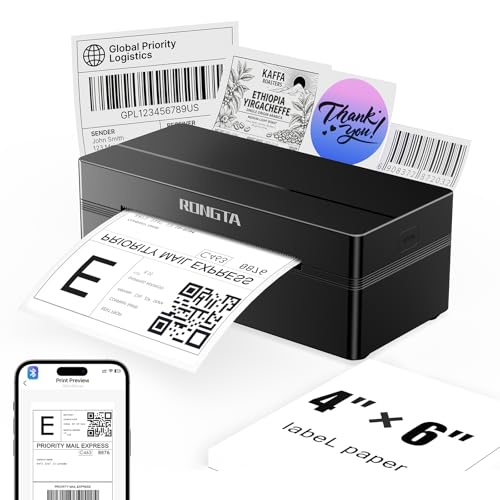
Rongta Bluetooth Shipping Label Printer, Wireless 4x6 Thermal Label Printer for Shipping Packages, Support Phones, Compatible with Windows macOS Android iOS for Small Business
As an Amazon Associate we earn from qualifying purchases. Product prices and availability are accurate as of the date/time indicated.

Thermal Shipping Label Printer 4x6 Bluetooth Label Maker for Small Business | Wireless Mailing Shipping Printer for USPS UPS Amazon Shopify - Compatible with iPhone Android Windows & Mac (Black)
As an Amazon Associate we earn from qualifying purchases. Product prices and availability are accurate as of the date/time indicated.

KNAON Shipping Thermal Label Printer, 4x6 Portable Label Printer, White | Bluetooth Label Printer, Portable for Home Office & Small Business, Works with iPhone, Android, PC, Perfect for Etsy, USPS
As an Amazon Associate we earn from qualifying purchases. Product prices and availability are accurate as of the date/time indicated.
Print technology, maximum label width and roll or sheet provision, print speed and resolution in the maker’s terms, connection types, stated platform and operating system compatibility, label stock requirements, and running consumables are each maker’s specification for the current exact model, and a thermal printer’s compatibility with a selling platform and a carrier must be confirmed for that platform before purchase. Prices are typical street ranges for the printer only; label stock is a continuing cost on both sides. Ratings reflect label suitability within each technology’s parish: a thermal on speed, cost per label, barcode reliability, and platform manners, an inkjet on colour and stock freedom for product labels, and both on the honesty with which their limits are stated.
Detailed Reviews: Thermal Printer vs Inkjet Printer for Labels Picks
1. Zebra Thermal Classes – Best Thermal Overall
Zebra’s thermal classes lead the thermal side because Zebra is the industry’s working standard: machines in its ranges that print shipping and warehouse labels all day, on the stocks and at the sizes the carriers use, behind a service and supplies parish that a growing business will not outgrow. For a seller whose labels are a production line, it is the recommendation with the fewest conditions.
Buy its size for your carrier’s label and its connection for your platform, confirmed in its maker’s lists. A Zebra so matched will be the least discussed machine in a business, printing in seconds for years, and a machine a business never discusses is a machine that has never stopped it, which in a packing room is the whole of fame.
2. Rollo Thermal Classes – Best for Online Sellers
Rollo’s classes compete on the modern seller’s exact workflow: a direct thermal printer in its pattern whose stated platform compatibilities speak to the marketplaces and carriers a home seller actually uses, in wired and wireless forms that suit a packing bench’s geography. For an online seller outgrowing an inkjet, it is the most direct step in this table.
Confirm your own platform and your label size in its maker’s current information before you order, as this article directs for every thermal. A Rollo so confirmed will repay its price in the currency its owner feels first — minutes, at a bench, in a season of orders — and its inkjet will be retired to colour with both machines’ honours intact.
3. DYMO LabelWriter 5 Classes – Best Home Labeller
DYMO’s LabelWriter 5 classes serve the address, file, jar, and household parish with a labeller in its pattern whose label system and software are designed for one label at a time, instantly, in a range of widths for a home office’s whole archaeology. For that parish it has no inkjet rival at any price.
Keep it in its parish and stock it with its own labels as its maker directs. A DYMO so kept will label a household so thoroughly that its owner will begin to suspect unlabelled objects of hiding, and a spice rack, a file box, and a cable drawer will all testify that the smallest printer in this article earned its desk.
4. Brother QL Classes – Best Versatile Labeller
Brother’s QL classes stand beside the DYMO parish with their own label system, cutter arrangements in their models’ patterns, and connection classes that suit an office’s range of computers. For a small office labelling everything from a badge to a box, that versatility in one machine is its recommendation.
Choose between this row and the DYMO above it by the label widths your office actually uses and the software your people prefer, tested where a shop allows. A QL so chosen will be understood by a whole office within a day, and a labeller an office understands is a labeller an office uses, which is the difference between a labelled archive and a labelled intention.
5. Munbyn Thermal Classes – Best Budget Shipping
Munbyn’s thermal classes give a beginning seller the shipping parish at the table’s kindest price: a direct thermal machine in its pattern, in the common shipping size, with platform compatibilities in its maker’s terms that cover the starter’s usual marketplaces. For a first thermal bought against an inkjet’s mounting evidence, it is the proportionate step.
Let its platform list be checked with the same severity as a Zebra’s, because a budget printer outside your workflow is no bargain. A Munbyn inside it will print a first season’s parcels for the cost of its labels, and its owner, upgrading later if volume argues, will do so with a packing bench’s experience rather than a catalogue’s.
6. Epson Inkjet Classes – Best for Colour Labels
Epson’s inkjet parish closes the table on the colour side in two forms: its EcoTank classes, printing label sheets for a maker’s batches at an ink cost its tank system was designed to civilize, and its ColorWorks classes, a dedicated colour label printer for the business whose volume has outgrown sheets. Between them they mark inkjet’s whole honest range in this comparison, from a desk to a small factory.
Choose the form by volume, as this article’s crossover teaches, and print on the stock made for the machine. An Epson so used will give a product its colours faithfully for years, and its owner will understand both technologies the way this article hopes every reader will: as two tools with two parishes, neither of which is the other’s failure.
Buying Guide: Choosing Between a Thermal Printer and an Inkjet Printer for Labels
Count your labels by type for one month, then buy for the larger parish
Keep, for one ordinary month, a count of your labels in two columns — shipping, barcode, and utility in one, colour and product in the other — with the minutes and the ink and sheets each column cost, because that count, and not a catalogue, will tell you which technology you are subsidizing. Buy a thermal printer for the first column when its volume is a daily or weekly rhythm, sized to your carrier’s standard label, with your selling platform named in its maker’s compatibility, its labels stocked in the correct size, and its head cleaning learned in its first week. Keep or buy an inkjet for the second column while its volume is a batch’s, on stocks made for it, with a template and a test sheet as its standing discipline. Price both purchases per finished label across a season, including the partial sheets and the cleaning cycles on one side and the rolls on the other, because per label, across time, is the only ledger in which these two technologies can be honestly compared.
Match the stock to the life the label must live
Ask of every label how long it must be read and in what conditions, and let the answer choose its stock and, where necessary, its technology. A shipping label’s life is days, in a carrier’s hands, and direct thermal on its standard stock is its perfect medium. A warehouse label’s life is a season of scanning. A product label’s life is its product’s, in a kitchen’s steam, a bathroom’s damp, a freezer’s cold, or a window’s sun, in the stocks rated by their makers for those conditions, on the technology those stocks require — which may be an inkjet’s water-resistant stock in its terms, or, at a volume and a durability beyond this article’s mainstream, a thermal transfer machine’s parish, priced as the industrial tool it is. Never let a direct thermal label be an archive, a certificate, or a safety record, because its chemistry is a traveller and not a historian, and a business that files in fading ink has chosen its future self an illegible inheritance.
Set each machine in its workflow, and keep both honest
Install the thermal printer at the packing bench, in the workflow of the platform that feeds it, with its labels loaded, a spare roll in sight, and its test label printed at every stock change, because a thermal printer’s reliability is a routine’s and not a miracle’s. Keep the inkjet’s label work in batches, its templates filed with its stocks, its heads exercised or maintained as its maker directs, and its finest stock committed only after a plain test sheet has taken the alignment’s risk. Replace a thermal printer when its head’s print, cleaned by its maker’s method, still leaves a line through every barcode, and an inkjet when its cost per colour label, honestly counted, has crossed the dedicated machine’s line, on that evidence. Thermal printer vs inkjet printer for labels ends, as it began, in a division of labour: thermal for the labels that travel and are scanned, inkjet for the labels that are looked at and loved — and a business that buys both tools for their own parishes, at the volumes its own month’s count prescribes, will print every label it makes faster, cheaper, and better than a business still asking one machine to be two, which is the whole and sufficient moral of the comparison.
Frequently Asked Questions About Thermal Printer vs Inkjet Printer for Labels
Which is better, a thermal printer or an inkjet printer for labels?
Each, for its own labels. A thermal printer is better for shipping, barcode, warehouse, and utility labels: faster, cheaper per label, with no ink ever, and a barcode that scans at a carrier’s first attempt, in the Zebra, Rollo, and DYMO classes in this table. An inkjet is better for colour product labels and small, varied runs, where its colour and its freedom of label stocks — matte, gloss, clear, water-resistant in their makers’ terms — are the product’s shopfront, in the Epson parish. Most growing sellers end with both, each in its parish, and the decision a beginner must make is only which to buy first, which a month’s count of their own labels, by type, will answer more reliably than any article: daily shipping buys the thermal, monthly colour batches keep the inkjet.
Do thermal labels fade, and does it matter?
Direct thermal labels do fade with time, heat, sunlight, and friction, at a rate that depends on the stock and its storage, because their image is a heat reaction in a coating rather than a pigment on a surface. For their intended lives it does not matter: a shipping label needs days, a warehouse label a season, and both will be read, scanned, and discarded well inside their stock’s clear life, especially if printed labels and spare rolls are stored away from heat and sun as their makers direct. It matters greatly outside that parish: an archive, a certificate, a long-life product in a sunny place, and a record a business must keep should never be direct thermal, and should be printed on an inkjet’s suitable stock or, at an industrial durability, on a thermal transfer machine. Match the label’s medium to the label’s life, and fading becomes a specification you chose rather than a surprise you filed.
Can I print shipping labels on my inkjet instead of buying a thermal printer?
You can, and most sellers begin there, with carrier labels printed on sheets or on paper and taped, and for a handful of parcels a week it is a rational parish. Its costs arrive with volume: ink spent on a label’s large black areas, sheets wasted on a small run, minutes spent cutting, peeling, and aligning, and a label that a damp journey can smudge in a way a thermal label’s cannot. Count those costs across your own month, in ink, stock, and time, and compare them with a thermal printer’s price and its rolls, as this article’s buying guide directs. Sellers who perform that count usually buy the thermal in the season their orders become a rhythm, and keep the inkjet, with relief on both sides, for the colour work it was always better at. The inkjet was never the wrong tool. It was a letter and colour printer being asked, increasingly, to be a factory.
What size thermal label printer do I need for shipping?
The size your carrier and your platform use as their standard, which in the common parish is the four by six inch shipping label the mainstream thermal printers in this table are built around — confirmed, before purchase, from your carrier’s current label specification, your selling platform’s stated printer compatibility, and the printer maker’s stated label widths and roll provisions for the exact model. A buyer whose work is addresses, products, and organization rather than parcels should instead buy the smaller labeller parish, in the DYMO and Brother QL classes, in their own widths, and not ask it for shipping duty. A buyer with both parishes should own both sizes, as this article’s households and businesses do, because a thermal printer’s dedication to its sizes is the source of its speed, and a machine that must be everything in this category ends, as in most categories, by being a compromise at the bench where seconds are money.
Related guides
- Best AAA Batteries for Office Remotes in 2026: AAA Batteries for Office Remotes
- Best Budget Tablet for Work Under 100 in 2026: Budget Tablets for Work Under $100, Office Work, and Productivity
- Best Gimbal for Office Vlogging in 2026: 7 Gimbals for Office Vlogging That Keep Your Video Smooth, Stable, and Professional in the Office
- Best Budget NAS Dust Filter for Maintenance in 2026: 7 Budget NAS Dust Filters for Maintenance With Clear Airflow, Simple Install, and Easy Use for NAS
More from Amazon
Programs that pair well with the guide above. Offers and eligibility are set by Amazon and may change.
Free shipping on eligible items, Prime Video and more. Eligible new members can start with a free trial.
Start a Prime free trialAd-free music streaming. Eligible new subscribers can start with a free trial.
Try Music Unlimited freeA Prime membership for ages 18-24 with a trial period. Eligibility is set by Amazon.
See Prime for Young AdultsAudiobooks and podcasts to listen to on the go. Eligible new members can start with a free trial.
Try Audible freeAs an Amazon Associate we earn from qualifying purchases.

Write Your Review
No reviews yet. Be the first to share your experience!